You can add block quotes to your Box Notes. When you add a block quote, Box displays a shaded vertical bar to the left of the text that you type or paste. You can also add images to block quotes.
Web Application
On the web application, you can insert a block quote in one of two ways: using the contextual menu or a key combination.
To insert a block quote using the contextual menu:
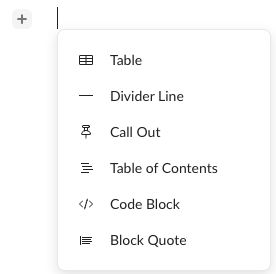
- Click where you want to insert the block quote. Box displays + to the left of your cursor.
- Click + and select Block Quote.
- Type or paste the quoted text.
To insert a block quote using keyboard keys:
- Click where you want to insert the block quote.
- On your keyboard, simultaneously press the > and space keys.
- Type or paste the quoted text.
To exit a block quote, press Enter on a blank line, or click outside the block quote.
Mobile Application
On your mobile device, you can insert a block quote by tapping the ”>” and space keys at the same time.
To insert a block quote using the keypad:
- Tap where you want to insert the block quote.
- On your keypad, simultaneously tap the > and space keys.
- Type or paste the quoted text.
To exit a block quote, tap Enter on a blank line, or tap outside the block quote. Last modified on February 19, 2026