

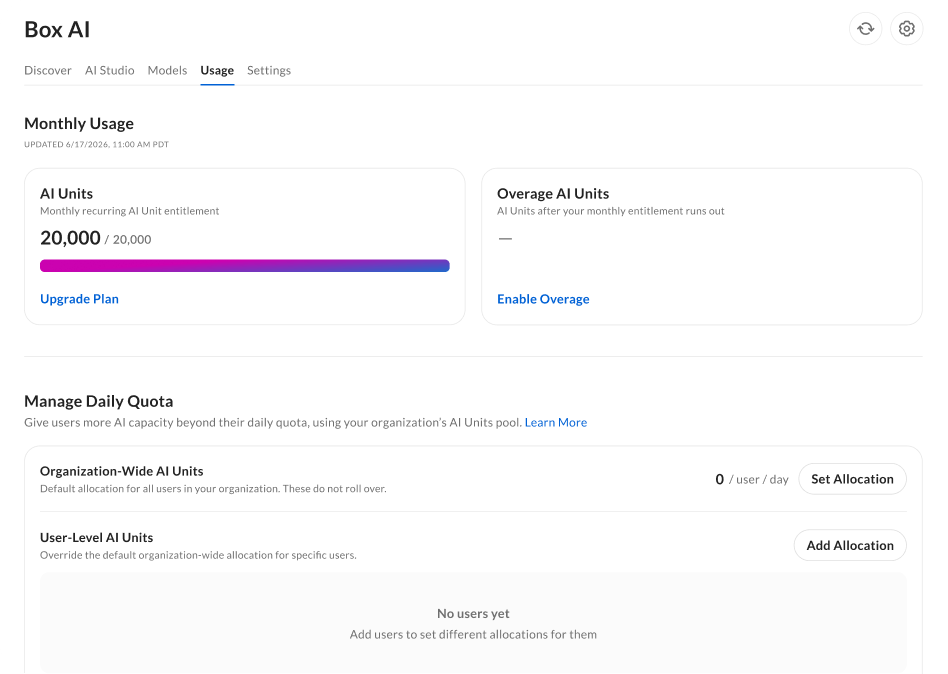
Monthly usage
The Monthly Usage section displays two progress trackers:- AI Units Consumed shows the number of AI Units consumed by the organization in the current calendar month.
- Select Upgrade Plan to switch to a different plan.
- Overage AI Units shows the number of AI Units consumed by the organization in the current calendar month that exceed your purchased entitlement.
- To enable overage, select Enable Overage, then set the number of AI Units users can consume beyond the purchased entitlement each period.
- The overage allocation starts as follows:
- If the allocation is less than the current overage, it begins on the first day of the next month.
- If the allocation is greater than the current overage, it begins immediately.
- To begin using overage AI Units, select the check box to agree to overage usage. The allocation stays in place for each future entitlement period until you change it. Box bills usage beyond the purchased entitlement, up to the allocated amount, at the end of each entitlement period.
The overage allocation limit is 1,000,000 AI Units per period.
Manage daily quota
Expand your organization’s AI capacity using the AI Units pool. You can allocate AI Units to specific users or to the organization-wide pool.- Organization-wide AI Units: Allocate AI Units across the organization by setting the amount per user.
- You can allocate up to 10,000 AI Units to the organization-wide pool.
- User-level AI Units: Allocate AI Units to specific users to be used by them only.
- The organization and individual allocations are not added together and are consumed separately. Users with a custom limit do not consume from the organization-wide pool, and they move to Box Agent Lite after reaching their user-level limit.
Insights
Usage monitoring
See which users are exhausting their daily usage and how often they are doing so within the last 30 days. Use this chart to identify heavy users and to inform governance or optimization decisions. For reference, daily usage is the user’s daily quota combined with the AI Units you allotted to the organization or user.Users approaching total daily usage
The Users Approaching Total Daily Usage chart shows each user’s daily usage as a percentage of their total daily usage. For more information on daily usage, see Understanding AI Units in Box.- The chart shows users from most to least usage.
- The horizontal axis shows usage as a percentage.
- An updated timestamp shows how current the data is.
Known limitations
- AI usage data reflects an approximate delay of up to one hour and is not shown in real time.
- When you manage a user’s daily quota, enabling that user’s AI overage can take longer than an hour.
- The non-chargeable daily usage quotas by user chart applies only to Enterprise Advanced and Enterprise Plus accounts that use non-chargeable Box Agent and custom agent usage. You must have AI Home enabled to see the chart.
- Usage from custom agents in Expanded Mode is not included in the daily quota chart, because Expanded Mode consumes AI Units from your organization’s enterprise pool.
- Monthly overage may be visible even if it is not enabled or usable. It is not charged until you enable it.
- Accounts that use resellers for AI Unit purchasing cannot enable overage for their organization.