

Box AI Studio is only available for Enterprise Advanced accounts.
Admin Enablement
Within the Admin Console, go to the Box AI section and then the Settings tab and set the permissions for both users and groups. If your organization has not fully enabled Box AI, you can click Enable for All to do so for all services.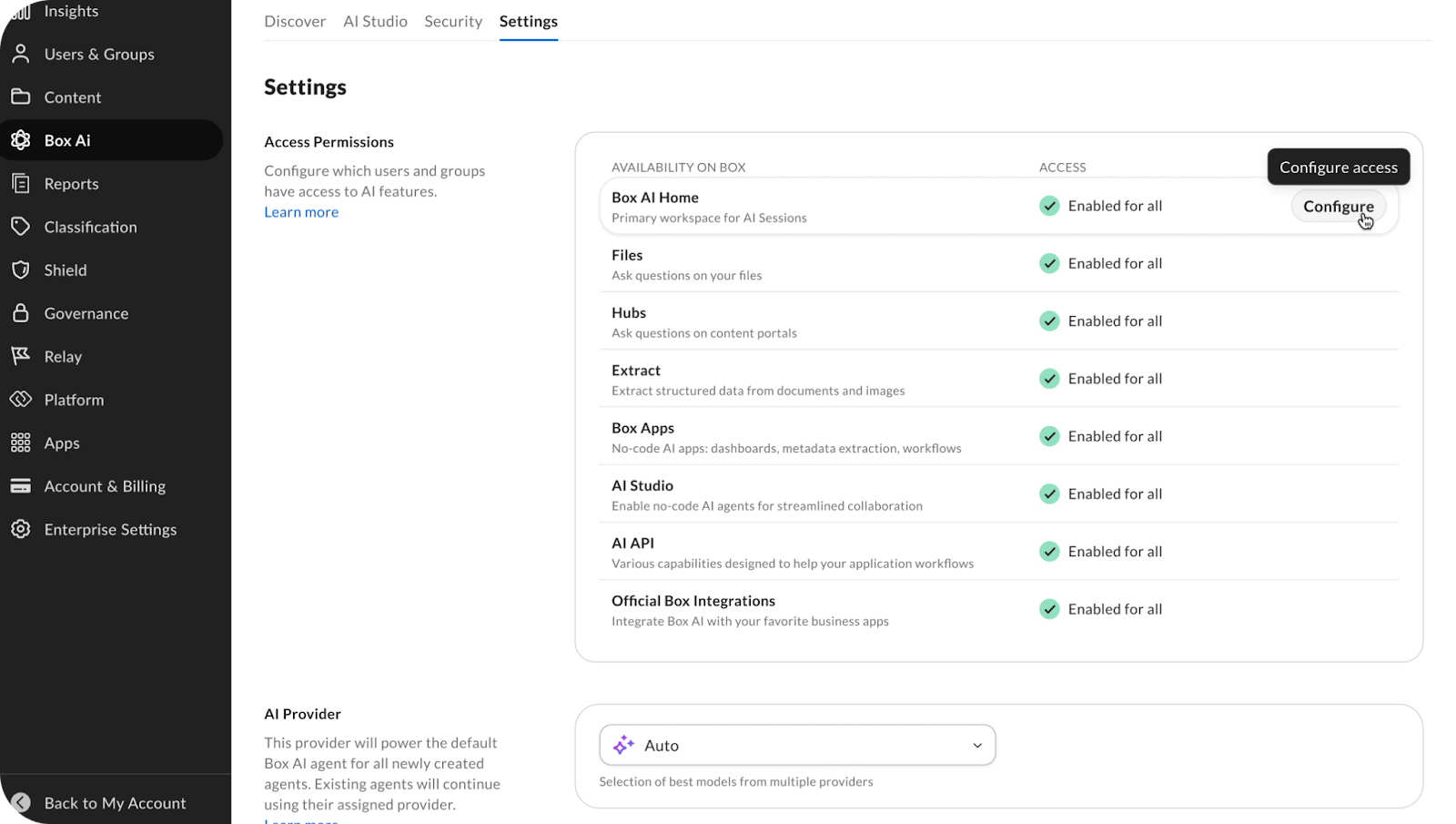
Enabling AI Settings
To enable Box AI Studio, first enable Box AI home:- Navigate to Box AI -> Settings.
- Select Configure on AI Home.
- Select Enable.
- After enabling AI Home, organizations that had AI Studio enabled with the legacy version will automatically have the new version of AI Studio enabled.
- After enabling AI Home, Admins cannot create new legacy agents. However, they can still modify existing legacy agents.
Upgrading Agents
When accessing legacy agents, you can upgrade the agent to begin using updated features. When configuring a legacy agent, click Upgrade Agent to create a new agent that mirrors the legacy agent.
- Agent name and appends “(new)” to it
- Description
- Custom instructions (if the legacy agent has both Q&A and Compose modes, only the Q&A custom instruction is copied; otherwise, the entire custom instruction is copied)
For new and upgraded agents, API usage is not supported.
Enabling Access for Co-Admins
To enable Box AI Studio for Co-Admins:- Go to the Admin Console -> then Users & Groups.
- Select View on the co-admin to configure.
- Click Edit on the Role and Access Permissions section.
- Toggle on for AI Studio.
Models tab in Box AI Settings page
The Models tab in the Box AI Settings is a catalog of all the models available for Box AI. The list displays the model name, provider, tier, whether it is available in Pro Mode, compliance badges (FRD, FRC, IL2, IL4), and query usage. As an admin, you can enable or disable models here by selecting the … button (More options menu) -> Enable or Disable.
Compliance Support
Customers are responsible for configuring suitable AI models based on their specific requirements. Visit Supported AI models - Box Dev Docs to see a full list of models and providers.Security
Guardrails
Guardrails help protect your organization from unauthorized access to sensitive content by restricting agent actions based on your organization’s policies. To control the scope of an agent, you can define which content and users have restrictions. Guardrails set the operating boundaries for an agent, ensuring it only takes actions within the scope you’ve defined. For example, you can restrict an agent from adding external collaborators, so the agent behaves predictably regardless of how it’s triggered. To configure guardrails:- Open guardrails settings in the agent configuration.
- Select a section to modify:
- Create File
- Choose a scope:
- No restrictions: Apply to all matching content or users.
- Allow on specific items: Apply only to the items or users you select.
- Don’t allow on specific items: Apply broadly, except for the items or users you exclude.
- Select the folders, classifications, or users referenced by your selection.
- Save the agent configuration to apply your guardrail changes.
- Saving the configuration applies the guardrails to new agents only.
- When you open a new agent, the guardrails are applied to the agent, but you can modify them later.
As part of processing a query, Box can choose the best available model from the list of enabled models; however, the final generated answer always uses the user-selected model.
Recommended setup for FedRAMP and DoW compliance
- Navigate to Box AI -> Settings in Admin Console.
- Click Configure on AI Home.
- Enable AI Home only for the admin by selecting the option Enable for selected users and groups.
- Go to Box AI -> Models tab.
- Use the Compliance filter (FRD, FRC, IL2, IL4) and disable all models that do not meet your organization’s compliance requirements.
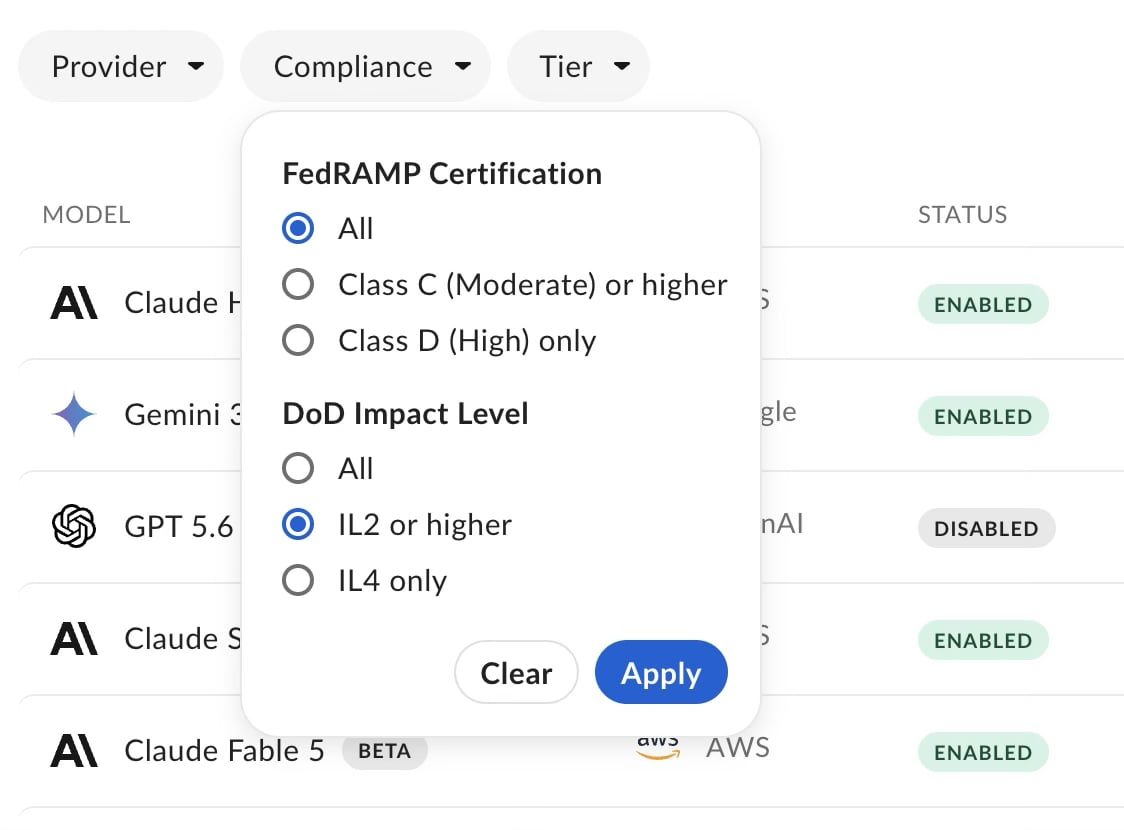
Government customers who must abide by the DoW order regarding restricting use of Anthropic must manually disable all Anthropic models.
Managing Custom Box Agents in Box AI Studio
To see a list of agents available, go to the AI Studio tab from the Box AI section in the Admin Console.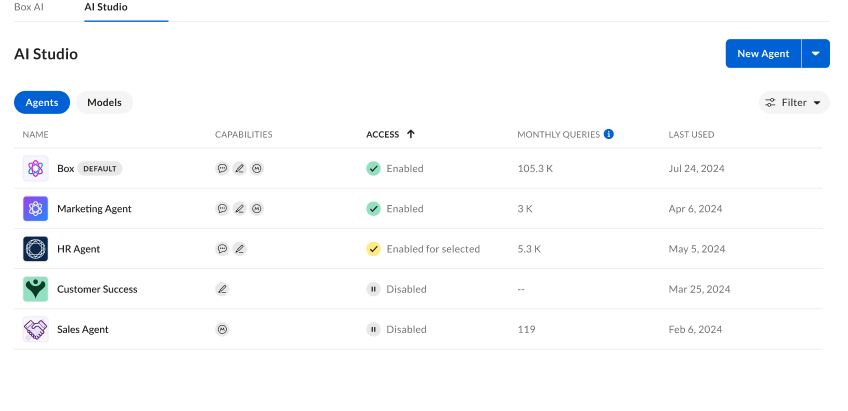
Managing Legacy Agents
From the legacy Agent view, you can see:- Name
- Capabilities
- Content Q&A
- Text Generation
- Access
- Enabled
- Enabled for selected
- Disabled
- Monthly Queries
- Last Used
- Type
- Content Q&A
- Text Generation
- Access
- Enabled
- Enabled for selected
- Disabled
- Edit
- Access
- Delete
- Deleting an agent cannot be undone.
Managing Agents
To see a list of agents available, go to the AI Studio tab from the Box AI section in the Admin Console. From the Agent view, you can see:- Name
- Access
- Created By
- Monthly Queries
- Last Used
- Access
- Enabled
- Enabled for selected
- Disabled
- Edit
- Duplicate
- Delete
- Deleting an agent cannot be undone.