> ## Documentation Index
> Fetch the complete documentation index at: https://docs.box.com/llms.txt
> Use this file to discover all available pages before exploring further.
# Box Notesのバージョン履歴の追跡
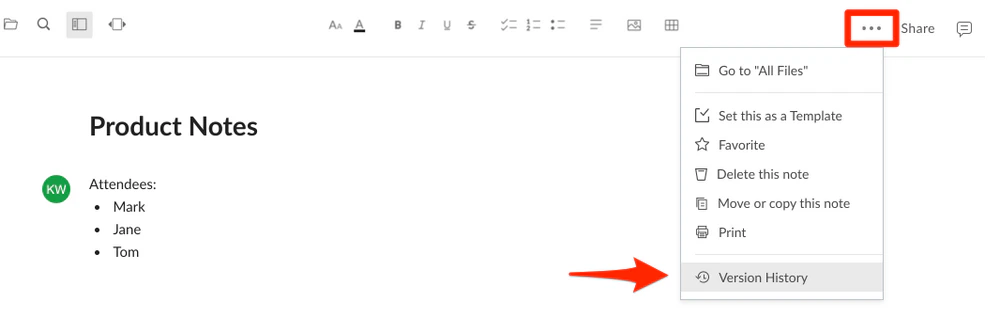
Box Notesで作業している間は、およそ5分間隔で、または何も操作しない状態が5分間続いた場合はその後最初に更新したときに、新しいバージョンが自動的に保存されます。 \[**その他のオプション**] メニュー (右上の \[**...**]) をクリックして、\[**バージョン履歴**] をクリックすると、Box Noteの過去のバージョンにアクセスできます。
 Box Noteの右側にバージョン履歴パネルが開き、リストの最上部に現在のバージョンが表示されます。 バージョンごとに、そのバージョンが保存された日時と、そのバージョンに関連付けられた編集者を表示できます。
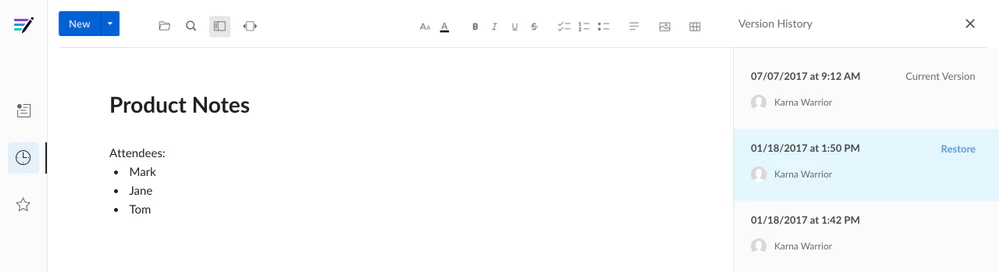 過去のバージョンを選択して表示したり、リストされている過去のバージョンの \[**復元**] をクリックしてそのバージョンを現行バージョンにすることができます。 この操作で、履歴が失われることはありません。 復元されたバージョンは、現行バージョンとして既存のバージョン履歴に追加されます。