> ## Documentation Index
> Fetch the complete documentation index at: https://docs.box.com/llms.txt
> Use this file to discover all available pages before exploring further.
# リテンションポリシーの編集
変更可能リテンションポリシーと変更不可リテンションポリシーは両方とも編集できます。 ただし、変更不可リテンションポリシーに対して可能なのは以下の操作のみです。
* 名前と説明の編集
* ポリシーへの[フォルダ](/ja/box-governance/retention/adding-folders-to-a-retention-policy)、[メタデータ](/ja/box-governance/retention/adding-metadata-to-a-retention-policy)、[分類ラベル](/ja/box-governance/retention/adding-classification-labels-to-a-retention-policy)の追加
* 期間の延長
変更可能リテンションポリシーに対しては、以下の操作も可能です。
* ポリシーからの[フォルダ](/ja/box-governance/retention/removing-folders-from-a-retention-policy)、[メタデータ](/ja/box-governance/retention/removing-metadata-from-a-retention-policy)、[分類ラベル](/ja/box-governance/retention/removing-classification-labels-from-a-retention-policy)の削除
* [ポリシーの削除](/ja/box-governance/retention/deleting-a-retention-policy)
* [変更不可ポリシーへの変換](/ja/box-governance/retention/convert-a-modifiable-retention-policy-to-a-non-modifiable-retention-policy)
詳細については、[変更可能リテンションと変更不可リテンション](/ja/box-governance/retention/about-retention-and-retention-policies#modifiable-and-non-modifiable-retention)を参照してください。
**注:**
変更不可リテンションポリシーは、[FINRA](https://www.finra.org/#/)などの規制要件を満たすよう設計されており、正しく設定すると、顧客はコンプライアンスや規制要件を満たすことができます。 これは、リテンションは、変更不可リテンションポリシーによってコンテンツに適用されると、削除することも短縮することもできないことを意味します。つまり、ポリシーの \[*期間*] と \[*ポリシーの適用先*] の設定は変更できません。また、フォルダを削除することもできません。
1. **\[管理コンソール] > \[Governance]** に移動します。
2. \[**リテンション**] タブで、編集するポリシーを見つけてクリックします。 ポリシーの詳細画面が表示されます。
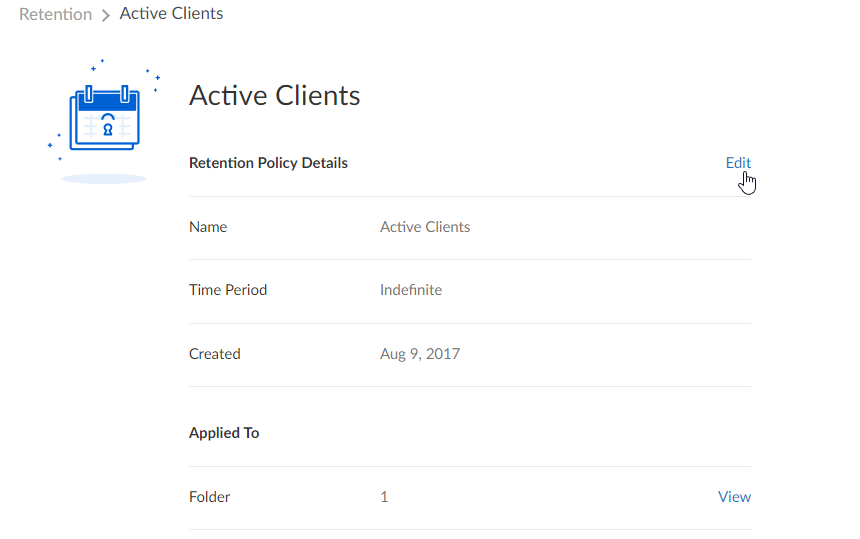
3. \[**リテンションポリシーの詳細**] セクションの横にある \[**編集**] をクリックします。
 4. 変更を加え、\[**保存**] をクリックします。
**注** リテンションポリシーが実際に適用されていることを確認するには、管理コンソールで \[**レポート**] > \[**レポート作成**] をクリックし、\[**ユーザーアクティビティ**] > \[**ポリシー**] > \[**リテンションポリシーの適用**] に移動します。
4. 変更を加え、\[**保存**] をクリックします。
**注** リテンションポリシーが実際に適用されていることを確認するには、管理コンソールで \[**レポート**] > \[**レポート作成**] をクリックし、\[**ユーザーアクティビティ**] > \[**ポリシー**] > \[**リテンションポリシーの適用**] に移動します。