> ## Documentation Index
> Fetch the complete documentation index at: https://docs.box.com/llms.txt
> Use this file to discover all available pages before exploring further.

# フォルダとファイルへの説明の追加

<div className="article_labels_list" style={{display: 'none'}} dangerouslySetInnerHTML={{__html: "has_image , End User , Content Management , Instructions , Article , Product Utilization , Box Web Application , Established , Instruction"}} />

Boxウェブアプリでは、**編集者のアクセス権限**が与えられているフォルダであれば、フォルダやファイルに**説明**を追加できます。 \[説明] フィールドの文字数上限は255文字です。

## **フォルダ:**

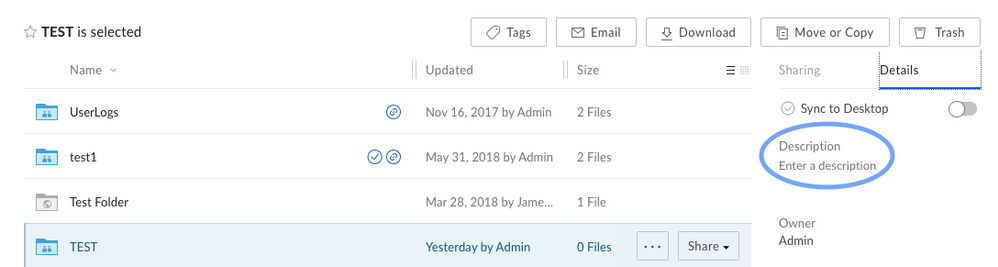
1. フォルダをクリックします (ただし、開かないでください)。
2. 右ペインの \[詳細] の下に \[説明] フィールドが表示されます。ここで直接説明を入力、変更できます。
<Frame>
  <img src="https://mintcdn.com/product-docs/Qyy8LmrN0pVKQFf5/images/box-fundamentals/fo.png?fit=max&auto=format&n=Qyy8LmrN0pVKQFf5&q=85&s=72b996e0d0f395f7456229da9ef60daf" alt="fo-png" width="998" height="267" data-path="images/box-fundamentals/fo.png" />
</Frame>

## **ファイル:**

1. ファイルをクリックします (ただし、プレビューしないでください)。
2. 右ペインの \[詳細] の下に \[説明] フィールドが表示されます。ここで直接説明を入力、変更できます。

<Frame>
  <img src="https://mintcdn.com/product-docs/KMHkzrLNZXajl-XP/images/box-fundamentals/screen-shot-2018-06-27-at-2-24-46-pm.png?fit=max&auto=format&n=KMHkzrLNZXajl-XP&q=85&s=ca3b58f36056c0d1a7bb6ca269c7fa46" alt="screen-shot-2018-06-27-at-2-24-46-pm-png" width="999" height="160" data-path="images/box-fundamentals/screen-shot-2018-06-27-at-2-24-46-pm.png" />
</Frame>
