> ## Documentation Index
> Fetch the complete documentation index at: https://docs.box.com/llms.txt
> Use this file to discover all available pages before exploring further.
# Canvasでのテンプレートの使用
export const InlineImage = ({src, alt = "", height = "1em"}) => {
return  ;
};
Box Canvasのテンプレートは、手動で各オブジェクトを追加することなくCanvas上のコンテンツを整理するのに役立ちます。
## テンプレートの選択
Canvasでテンプレートを選択するには、Canvasのツールバーでテンプレートアイコン をクリックします。
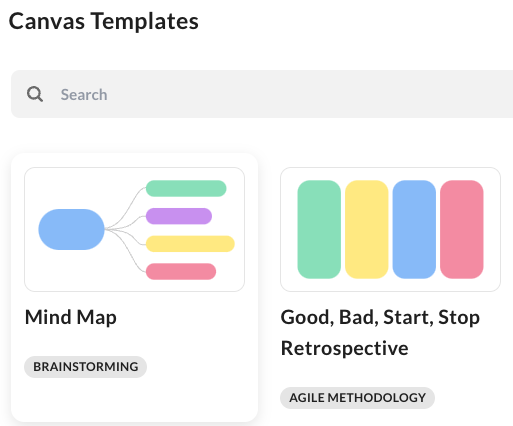
テンプレートの選択では、各カテゴリに割り当てられている、事前入力された使用可能なテンプレートが表示されます。例えば、マインドマップ (ブレインストーミング)、2つの真実と1つの嘘 (アイスブレイク)、RACIチャート (ビジネス) などがあります。
各テンプレートのタイルには、テンプレートの名前、レイアウト、割り当てられているカテゴリが表示されます。
;
};
Box Canvasのテンプレートは、手動で各オブジェクトを追加することなくCanvas上のコンテンツを整理するのに役立ちます。
## テンプレートの選択
Canvasでテンプレートを選択するには、Canvasのツールバーでテンプレートアイコン をクリックします。
テンプレートの選択では、各カテゴリに割り当てられている、事前入力された使用可能なテンプレートが表示されます。例えば、マインドマップ (ブレインストーミング)、2つの真実と1つの嘘 (アイスブレイク)、RACIチャート (ビジネス) などがあります。
各テンプレートのタイルには、テンプレートの名前、レイアウト、割り当てられているカテゴリが表示されます。
 使用するテンプレートをクリックすると、そのテンプレートの詳細な説明とレイアウトが記載されたウィンドウが表示されます。 テンプレートの選択に戻るには、ウィンドウの左上にある矢印をクリックします。 選択したテンプレートを挿入するには、\[**テンプレートを挿入**] をクリックします。