> ## Documentation Index
> Fetch the complete documentation index at: https://docs.box.com/llms.txt
> Use this file to discover all available pages before exploring further.
# Using Input Text Validation
Users can configure **Text Input** fields to accept or restrict the type of data that recipients can enter based on a specific format, style, or number range. These validation settings are configured within the document preparation experience when sending out a signature request or creating, modifying, or utilizing a reusable template.
## Configuring text input validation
To configure the **Text Input** field validation settings within a signature request or reusable template:
1. Add a **Text Input** field to the request or template.
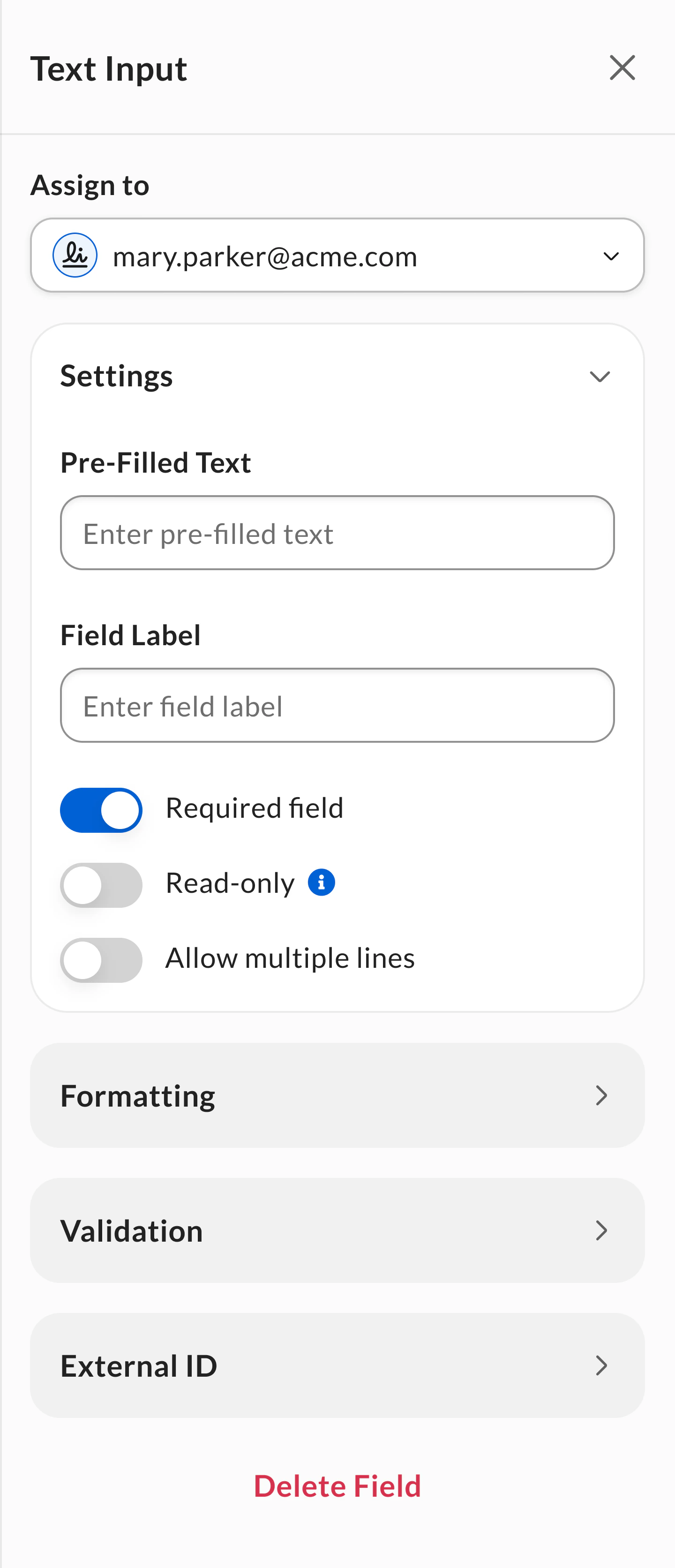
2. Select the **Text Input** field to configure field settings.
3. Click to expand the **Validation** section.
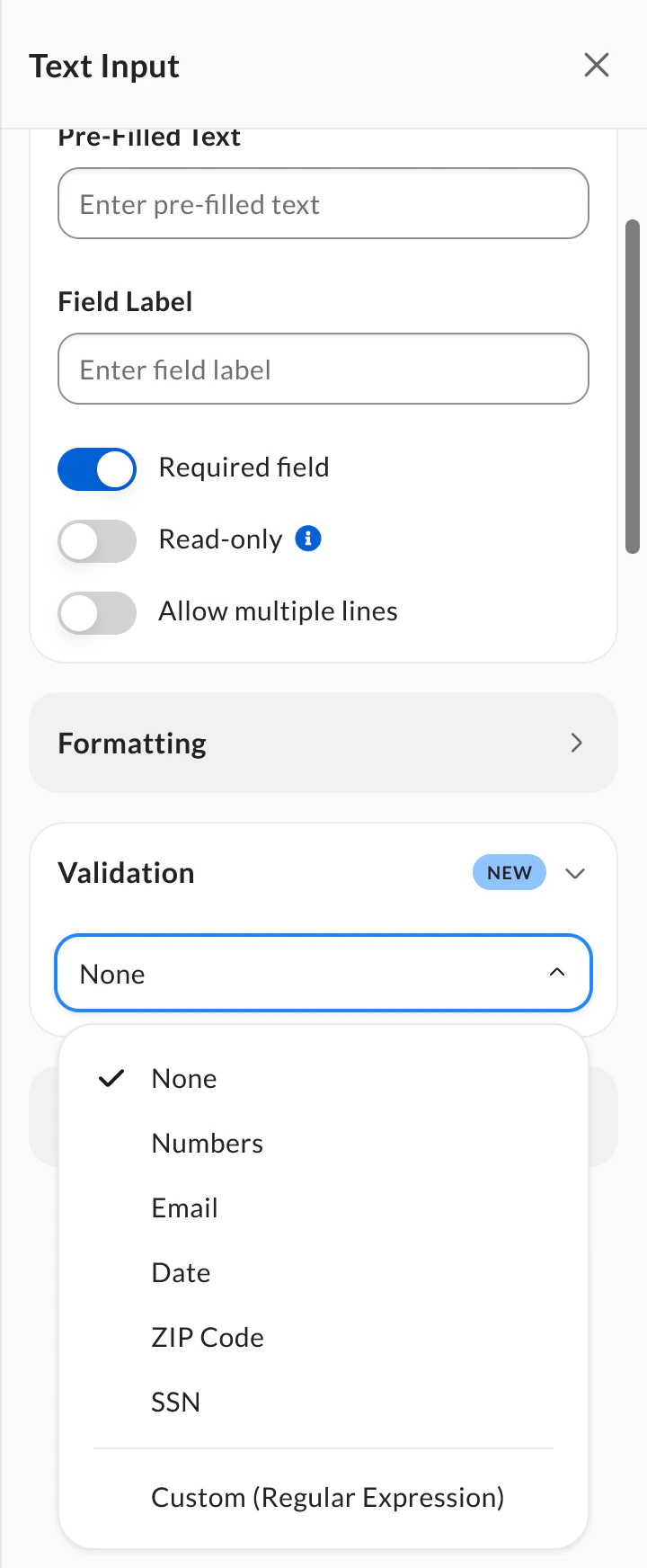
4. Select your validation option:
* **Predefined validation types**: Choose from standard formats like numbers, email, dates, ZIP codes, or SSN.
* **Custom (Regular Expression)**: Create your own validation pattern for organization-specific requirements. See [Custom (Regular Expression) validation](#custom-regular-expression-validation) for setup instructions and examples.
 **Notes:**
* Fields configured with text input validation cannot be configured as read-only fields and do not support multiple line data entry.
* Predefined validations are supported via template tags, but the Custom (Regular Expression) option isn’t supported. For more information on template tags, see [Creating Templates Using Tags](/en/box-sign/templates/creating-templates-using-tags). For more information on the Custom (Regular Expression) option, see [Custom (Regular Expression validation)](#custom-regular-expression-validation) below.
* All text input validations are supported via public API. For more information, see the [Box Sign API Reference](https://developer.box.com/reference/resources/sign-request/).
## Supported validation types
The following table lists the various supported validation for **Text Input** fields:
| Validation option | Validation requirements | Valid input example |
| ---------------------------------- | ------------------------------------------------------------------------------------------------------------------------------------------------------------------------------------------------------------------------------------------------------------------------------------ | ------------------------------------------------------------------------------------------------------------------------------------------------------------------------------------------ |
| None (default option) | • No validation applied | N/A |
| Number | • Allow digits only (0-9)
**Notes:**
* Fields configured with text input validation cannot be configured as read-only fields and do not support multiple line data entry.
* Predefined validations are supported via template tags, but the Custom (Regular Expression) option isn’t supported. For more information on template tags, see [Creating Templates Using Tags](/en/box-sign/templates/creating-templates-using-tags). For more information on the Custom (Regular Expression) option, see [Custom (Regular Expression validation)](#custom-regular-expression-validation) below.
* All text input validations are supported via public API. For more information, see the [Box Sign API Reference](https://developer.box.com/reference/resources/sign-request/).
## Supported validation types
The following table lists the various supported validation for **Text Input** fields:
| Validation option | Validation requirements | Valid input example |
| ---------------------------------- | ------------------------------------------------------------------------------------------------------------------------------------------------------------------------------------------------------------------------------------------------------------------------------------ | ------------------------------------------------------------------------------------------------------------------------------------------------------------------------------------------ |
| None (default option) | • No validation applied | N/A |
| Number | • Allow digits only (0-9)
• No spaces allowed
• No negative signs allowed
• Optional decimal separator:
• Period (.)
• Comma (,)
• Decimal separator cannot be followed or preceded by spaces or line breaks | • 12345
• 12,345
• 12.345 |
| Email | • Email syntax: [example@mail.com](mailto:example@mail.com)
• Minimum input must follow the format *@*.\* where each \* represents any alphanumeric character (except the domain, which cannot start with a number).
• No validation on the actual email address. | • [user@box.com](mailto:user@box.com)
• [user100@box.com](mailto:user100@box.com)
• [user@100box.com](mailto:user@100box.com)
• [user@box.100.com](mailto:user@box.100.com) |
| Date | • YYYY-MM-DD (ISO Standard) (default option)
• MM/DD/YYYY (US)
• DD/MM/YYYY (UK, EU)
• YYYY/MM/DD (JP, CH, KO) | • 2025-05-22
• 05/22/2025
• 22/05/2025
• 2025/05/22 |
| ZIP Code | • ZIP (US-based) (default option)
• 5-digit numeric code: #####
• ZIP+4 (US-based)
• 9-digit numeric code: #####-####
• ZIP (JP-based)
• 7-digit numeric code: ###-### | • 12345
• 12345-6789
• 100-0001 |
| SSN (Social Security Number) | • US based.
• 9-digit numeric code: ###-##-#### | 000-00-0000 |
| Custom (Regular Expresion) | Custom regex pattern defined by sender. See Custom (Regular Expression) section for details. | Varies based on pattern |
Custom (Regular Expression) validation
Beyond the standard validation options, Box Sign offers a **Custom (Regular Expression)** option to customize validation for fields that need to meet requirements specific to your organization or region.
Custom validation uses **regular expressions (regex)**, which are sequences of characters that describe a specific pattern of allowed input for a field.
**Note:**
Custom regex validation is supported through the public API. For more information, see the [Box Sign API Reference](https://developer.box.com/reference/resources/sign-request/).
### Setting up custom validation
To configure custom validation:
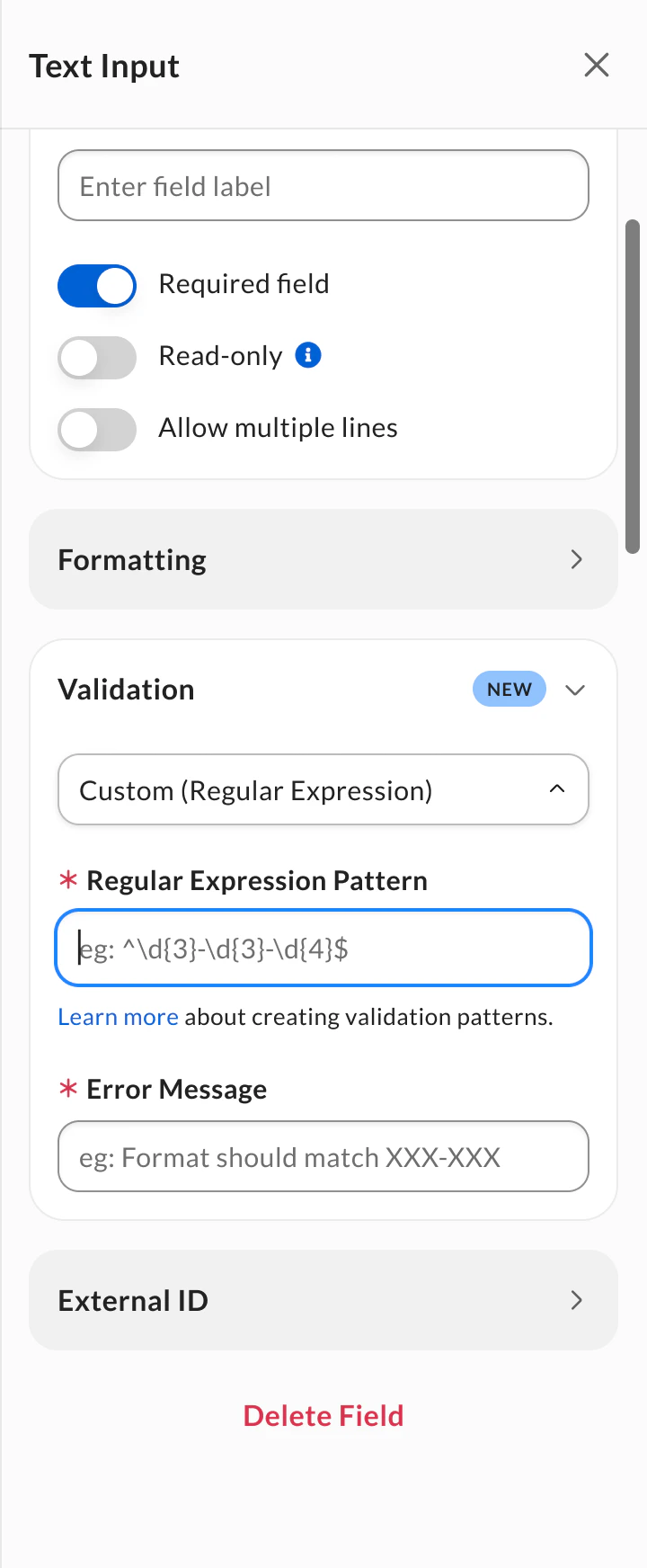
1. Select **Custom (Regular Expression)** from the **Validation** dropdown menu.
2. Enter your regex pattern in the **Regular Expression Pattern** field. Provide an **Error Message** to display when the signer’s input is invalid.
3. (Recommended) Fill in the **Field Name (Label)** field to inform signers what data to populate in the field.
 Make sure your regex pattern uses a valid and supported format. Otherwise, you won't be able to apply the validation to the field. You might encounter two input errors: "Invalid pattern" if your regex pattern is invalid, or "Unsupported pattern" if your regex pattern is not supported by Box Sign guidelines. See [Regex pattern requirements](#regex-pattern-requirements) for supported syntax and limitations.
When the signer enters data, the system checks it against your pattern. If the input doesn't match, the field displays the error message you defined.
Make sure your regex pattern uses a valid and supported format. Otherwise, you won't be able to apply the validation to the field. You might encounter two input errors: "Invalid pattern" if your regex pattern is invalid, or "Unsupported pattern" if your regex pattern is not supported by Box Sign guidelines. See [Regex pattern requirements](#regex-pattern-requirements) for supported syntax and limitations.
When the signer enters data, the system checks it against your pattern. If the input doesn't match, the field displays the error message you defined.
Regex pattern requirements
To ensure your custom regex pattern works correctly, follow these guidelines:
**Supported characters:**
* Unicode letters (`\p{L}`)
* Unicode numbers (`\p{N}`)
* Whitespace (`\s`)
* Common punctuation: `- ( ) . , ' \ / @ _ : % ! ? ^`
* Common international currency symbols: `$ € £ ¥ ₹ ₩ ₽ ₺ ₫ ₴ ₱`
**Box Sign does not support the following regex patterns:**
* Matching back references (`\\[1-9]`)
* Nested quantifiers (`++, **`)
* Lookbehinds (`(?<=, (?^(\\+1\[-.\s]?)?(\\(?\d\{3}\\)?)\[-.\s]?\d\{3}\[-.\s]?\d\{4}\$ | Acceptable examples:
• 123-456-7890
• (123) 456-7890
• 1234567890
• +1-123-456-7890 |
| Japan phone number | ^(\\+81\[-.\s]?)?(0?\d\{1,4})\[-.\s]?\d\{1,4}\[-.\s]?\d\{4}\$ | Acceptable examples:
• 03-1234-5678
• 045-123-4567
• 090-1234-5678
• +81-90-1234-5678 |
| International format (flexible) | ^\\+?\[0-9]\[0-9\s.\\-]\{6,14}\$ | • Allows spaces, dots, or hyphens between digits
• 7–15 digits (ITU standard range)
• Optional “+” |
| International Format (E.164-aligned) | ^\\+?\d\{7,15}\$ | • Doesn’t allow spaces or special characters
• Accepts 7 to 15 digits
• Optional “+” |
#### Alphanumeric identifiers
| Use case | Regex pattern | Description |
| ----------------------------------------- | ----------------------------------------- | ------------------------------------------------------------------------ |
| Alphanumeric Only | ^\[A-Za-z0-9]+\$ | Letters and digits only, any length |
| Alphanumeric with underscores | ^\[A-Za-z0-9\_]+\$ | Letters, digits, and underscores |
| Alphanumeric with hyphens | ^\[A-Za-z0-9-]+\$ | Letters, digits, and hyphens (common for contract IDs, tracking numbers) |
| Alphanumeric with underscores and hyphens | ^\[A-Za-z0-9\_-]+\$ | Letters, digits, underscores, and hyphens |
| Prefix + digits (e.g. ABC-12345) | ^\[A-Za-z]\{2,5}-\d\{3,10}\$ | Common for invoice or document numbers |
#### Other common patterns
| Use case | Regex pattern | Description |
| ---------------------- | ---------------------- | ------------------------------------------------- |
| Street Address | ^\[0-9A-Za-z\s.,'-]+\$ | Allows numbers, letters, hyphens, and punctuation |
| Uppercase Letters Only | ^\[A-Z]+\$ | Accepts only uppercase letters |
| Lowercase Letters Only | ^\[a-z]+\$ | Accepts only lowercase letters |
## Known limitations
* Text input validation is not available for CFR Part 11 signature requests or templates.