> ## Documentation Index
> Fetch the complete documentation index at: https://docs.box.com/llms.txt
> Use this file to discover all available pages before exploring further.
# Job Report Archive
export const InlineImage = ({src, alt = "", height = "1em"}) => {
return  ;
};
Box maintains raw Shuttle job data for 90 days after jobs are completed. After this period of time, the job run appears with a clock icon () on the **History** page. This indicates that the in-app report is no longer available.
;
};
Box maintains raw Shuttle job data for 90 days after jobs are completed. After this period of time, the job run appears with a clock icon () on the **History** page. This indicates that the in-app report is no longer available.
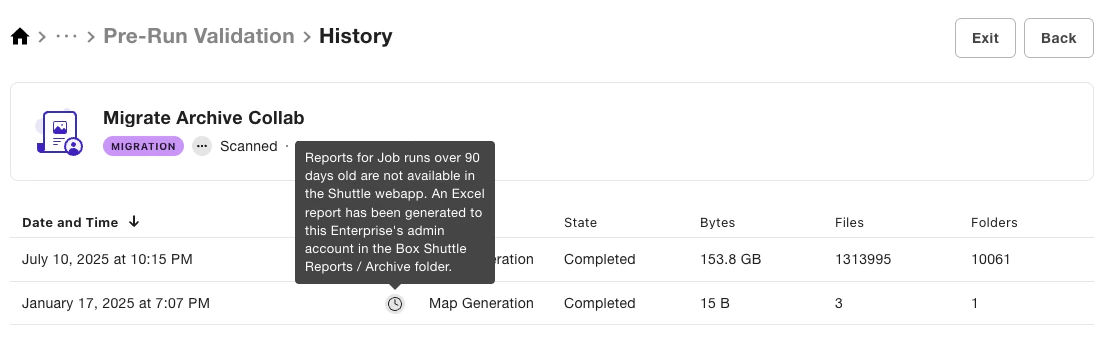 Users can still request the comprehensive report containing all job data from their admin. This report is stored in the **Archive** subfolder within the **Box Shuttle Reports** folder in the Admin user’s account. Once Box determines that job data was exported successfully, the raw job data is permanently deleted.
The report is generated whether or not any job [reports were generated manually](/en/box-shuttle/box-shuttle-reports/exporting-box-shuttle-reports) to ensure that you always have complete information available about the Shuttle jobs you ran.
Users can still request the comprehensive report containing all job data from their admin. This report is stored in the **Archive** subfolder within the **Box Shuttle Reports** folder in the Admin user’s account. Once Box determines that job data was exported successfully, the raw job data is permanently deleted.
The report is generated whether or not any job [reports were generated manually](/en/box-shuttle/box-shuttle-reports/exporting-box-shuttle-reports) to ensure that you always have complete information available about the Shuttle jobs you ran.