> ## Documentation Index
> Fetch the complete documentation index at: https://docs.box.com/llms.txt
> Use this file to discover all available pages before exploring further.
# Getting Box Support Assistance
This article is about Box Shuttle, a **standalone tool**. If you are using **Shuttle in Admin Console**, see [this document](/en/box-shuttle/about-box-shuttle/introducing-box-shuttle).
If you need help with your Box Shuttle migration from the Box Support team, you can [submit a ticket](https://support.box.com/hc/en-us/requests/new) to the team on the Box Support site by selecting "Product Issue" in the first dropdown, then selecting "Box Shuttle".
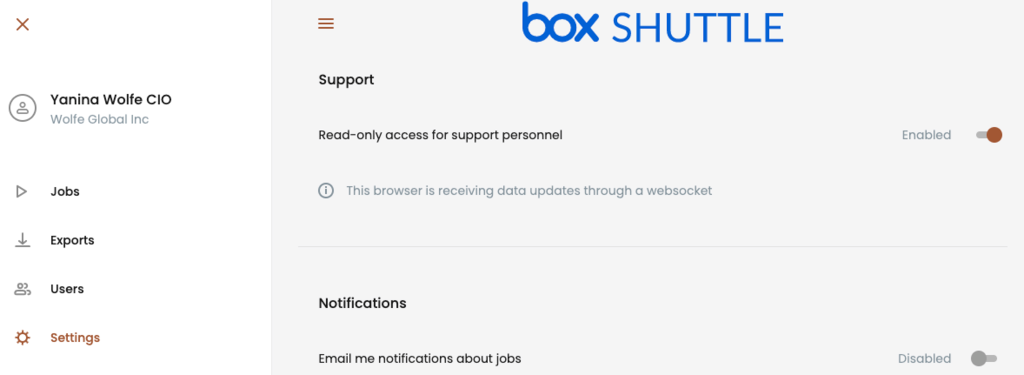
Often the Box Shuttle support team will need to access your Box Shuttle account for diagnostic and troubleshooting purposes. To enable this, please use the enable support access within your Box Shuttle account. Follow these easy steps to get this set up:
1. In your Shuttle account, select the three lines to open up your side menu.
2. Click on **Settings.**
3. Enable **Read-only access for support personnel**.
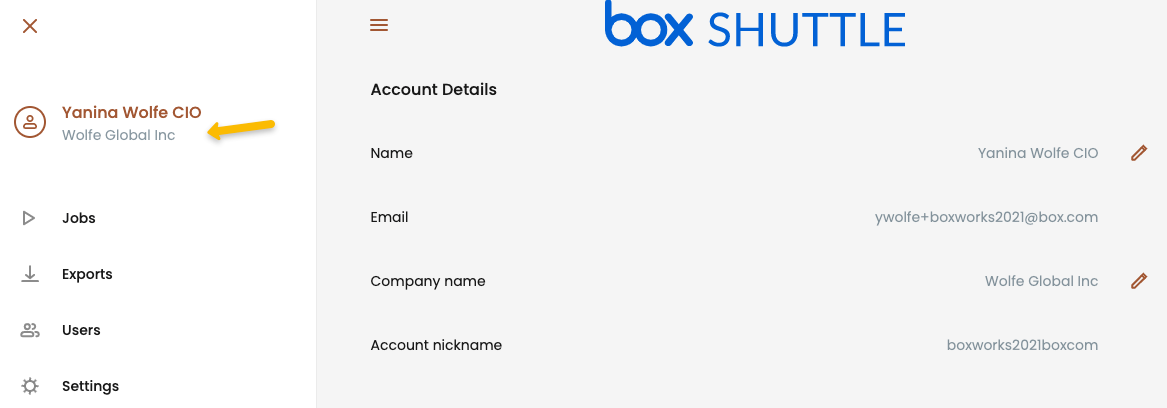
To find your account nickname, click on your company name after opening the side menu:
 2. Click on **Settings.**
3. Enable **Read-only access for support personnel**.
2. Click on **Settings.**
3. Enable **Read-only access for support personnel**.