> ## Documentation Index
> Fetch the complete documentation index at: https://docs.box.com/llms.txt
> Use this file to discover all available pages before exploring further.
# Configuring Permissions Between Information Barrier Segments
Once you have [created segments in an information barrier](/en/box-shield/shield-information-barrier/creating-an-information-barrier-user-segment), you must configure the permissions between each segment. For each segment, you define whether every other segment can access that segment's content.
The default relationship for each segment relationship is to allow access.
1. Go to **Admin Console > Shield**.
2. Click the **Information Barrier** tab. Make sure you have at least 2 segments defined.
3. Click **Define Segment Permissions**.
4. For each segment relationship, click the Access drop-down menu and select:
* *Can Access* - to allow members of the segment on the left to access content owned by members of the segment on the right.
* *Cannot Access* - to prevent members of the segment on the left to access content owned by members of the segment on the right. (This creates an ethical wall).
**Note**
Each relationship is a one-way relationship. To define a two-way ethical wall, select *Cannot Access* for both of the segment relationships.
5. Click **Save**.
The following image shows an example of some relationships. In this example, 5 segments have been defined.
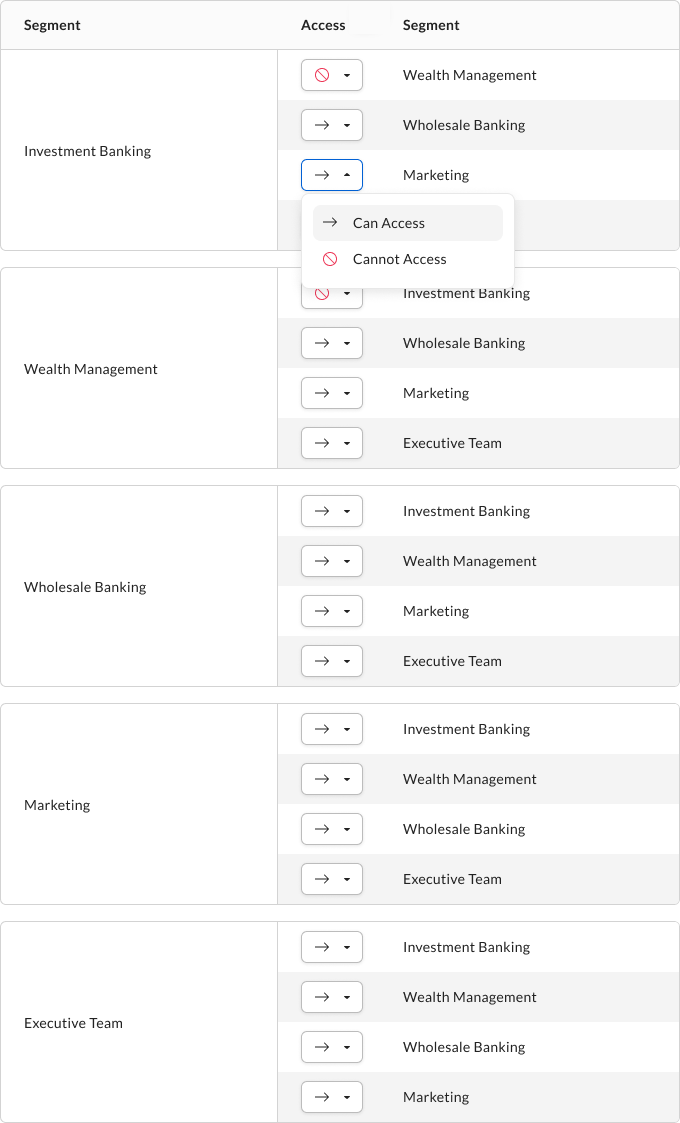 Here, the following ethical walls have been defined:
* Users in the Investment Banking segment cannot access content owned by users in the Wealth Management segment.
* Users in the Wealth Management segment cannot access content owned by users in the Investment Banking segment.
Here, the following ethical walls have been defined:
* Users in the Investment Banking segment cannot access content owned by users in the Wealth Management segment.
* Users in the Wealth Management segment cannot access content owned by users in the Investment Banking segment.