> ## Documentation Index
> Fetch the complete documentation index at: https://docs.box.com/llms.txt
> Use this file to discover all available pages before exploring further.
# Enabling Box Relay for your Organization
By default, Relay is enabled only for your Box admins and co-admins and disabled for everyone else. As an admin or co-admin, you can in turn:
* Enable Relay for everyone in your organization.
* Enable Relay only for individuals or groups you designate (that is, creating an Allow List).
* Enable Relay for everyone except individuals or groups you designate (that is, creating a Deny List).
People you enable can create workflows on any folder they own, co-own, or edit.
**To enable Box Relay for your managed users**:
1. From your admin console, go to **Enterprise Settings** > **Content and Sharing** tab.
2. Scroll down to the **Relay** section.
3. Configure who can use Relay, who can create workflows, and who can publish workflow templates. See the [Relay](/en/box-admin-tools/box-admin-reference/enterprise-settings-content-sharing-tab#relay) section in [Enterprise Settings: Content & Sharing Tab](/en/box-admin-tools/box-admin-reference/enterprise-settings-content-sharing-tab) for details.
4. Click Save.
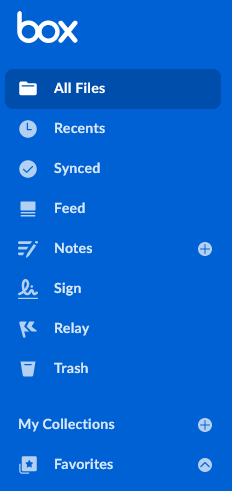
For the people you enabled Relay for, a link to Relay displays in the lefthand navigation of their Box Web app home page.
 **Notes**
* You can enter up to 100 names/email addresses and up to 100 groups. If you want to enable or disable more, you'll have to enable or disable Box Relay for the entire organization.
* You can only select groups that have **Permission Setting** set to **Admins Only**. For details, see [Creating and managing groups.](/en/box-admin-tools/managing-box-users-and-admins/groups/creating-and-managing-groups)
* Also, even if you disable Relay for all managed users in your enterprise, admins and automations co-admins still have Relay - that is, regardless of this setting, admins and automations co-admins always have Relay.
* To make File Request available as a workflow trigger option, [verify File Request is accessible](/en/box-fundamentals/for-admins/collaborating/sharing-content-with-box/administering-box-file-request) in your organization.
* If an individual who has created workflows leaves the organization, you can transfer their workflows and their content to someone else. To do this, from your Admin Console, navigate to **Users and Groups**, select the user you want to delete, and then go to the **Edit User Account Details** section to delete the user and transfer their content and workflows.
**Notes**
* You can enter up to 100 names/email addresses and up to 100 groups. If you want to enable or disable more, you'll have to enable or disable Box Relay for the entire organization.
* You can only select groups that have **Permission Setting** set to **Admins Only**. For details, see [Creating and managing groups.](/en/box-admin-tools/managing-box-users-and-admins/groups/creating-and-managing-groups)
* Also, even if you disable Relay for all managed users in your enterprise, admins and automations co-admins still have Relay - that is, regardless of this setting, admins and automations co-admins always have Relay.
* To make File Request available as a workflow trigger option, [verify File Request is accessible](/en/box-fundamentals/for-admins/collaborating/sharing-content-with-box/administering-box-file-request) in your organization.
* If an individual who has created workflows leaves the organization, you can transfer their workflows and their content to someone else. To do this, from your Admin Console, navigate to **Users and Groups**, select the user you want to delete, and then go to the **Edit User Account Details** section to delete the user and transfer their content and workflows.