> ## Documentation Index
> Fetch the complete documentation index at: https://docs.box.com/llms.txt
> Use this file to discover all available pages before exploring further.
# Accessing Box Notes Inbox
export const InlineImage = ({src, alt = "", height = "1em"}) => {
return  ;
};
Your Box Notes Inbox enables you immediately to see which Box Notes have been recently edited by collaborators. To view your Box Notes Inbox, in the lefthand navigation in any Box Note click the Inbox icon ().
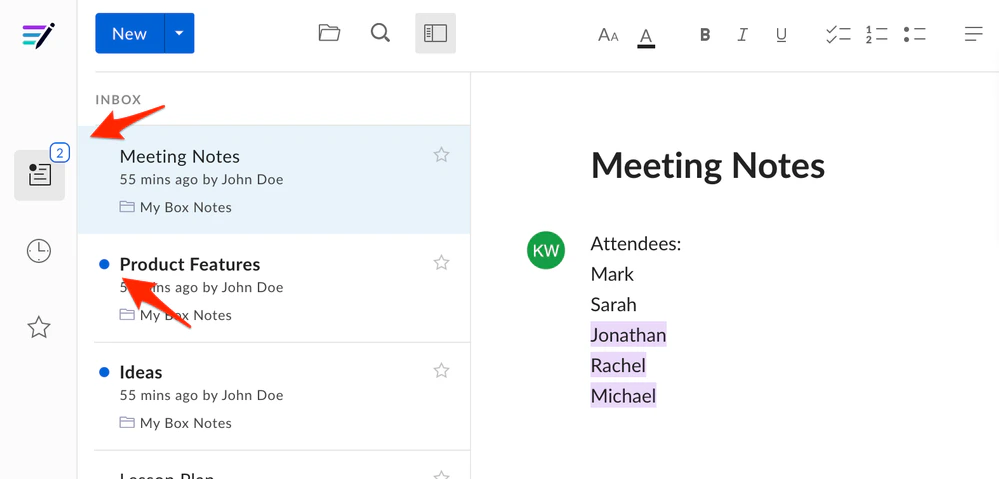
Any Box Notes updated since the last time you opened Box Notes are pushed to the top of the list and display with a blue dot. The Inbox icon also displays the number of updated Box Notes you have not viewed yet. After you view these Box Notes, the blue dot and number no longer display.
;
};
Your Box Notes Inbox enables you immediately to see which Box Notes have been recently edited by collaborators. To view your Box Notes Inbox, in the lefthand navigation in any Box Note click the Inbox icon ().
Any Box Notes updated since the last time you opened Box Notes are pushed to the top of the list and display with a blue dot. The Inbox icon also displays the number of updated Box Notes you have not viewed yet. After you view these Box Notes, the blue dot and number no longer display.