> ## Documentation Index
> Fetch the complete documentation index at: https://docs.box.com/llms.txt
> Use this file to discover all available pages before exploring further.
# Annotating a PDF With Notability
Notability allows users to create, edit, and share business plans all in one place. Both beautiful and functional, Notability seamlessly combines three major ways to capture information: handwriting, typing, and recording. It contains a powerful feature set that helps you be more productive, and provides the tools to capture, create, and share information more effectively.
## There are two ways Box uniquely integrates with Notability.
First, you can start notes in Notability and then send them to Box. Simply tap **share** in Notability, select **Box**, and pick your destination folder. Furthermore, if you set up auto-sync in Notability, all of your notes will automatically be sent to Box without you having to think about it.
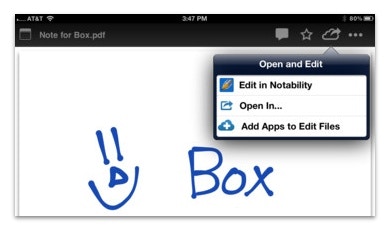
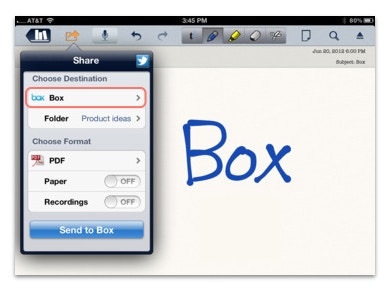 Second, you can start notes in Box or edit documents you receive from coworkers. To start a note in Box, **tap the cloud** in the lower-left-hand corner and select **Notability**. Then when you're done, tap the Box arrow and your file will be saved to Box. Additionally, if you receive PDFs, RTFs, or Notes from coworkers, these can be opened and edited in Notability. **Tap the document** to view it in Box, **then tap the cloud** in the upper-right-hand corner, and **select Edit** in Notability. Once you're done, tap the Box arrow and you'll be taken right back to Box.
 If you have SSO, you can log into Box through Notability by entering your email address and leaving the password blank. You will then be redirected to your active directory page where you can login using your company credentials.
You can download Notability [here](https://itunes.apple.com/us/app/notability-take-notes-annotate/id360593530?mt=8) and if you experience any issues, you can reach Notability support at [support@gingerlabs.com](mailto:support@gingerlabs.com).
If you have SSO, you can log into Box through Notability by entering your email address and leaving the password blank. You will then be redirected to your active directory page where you can login using your company credentials.
You can download Notability [here](https://itunes.apple.com/us/app/notability-take-notes-annotate/id360593530?mt=8) and if you experience any issues, you can reach Notability support at [support@gingerlabs.com](mailto:support@gingerlabs.com).