> ## Documentation Index
> Fetch the complete documentation index at: https://docs.box.com/llms.txt
> Use this file to discover all available pages before exploring further.
# Editing a Retention Policy
You can edit both modifiable and non-modifiable retention policies. However, for a non-modifiable retention policy, you can only:
* Edit its name and description
* Add [folders](/en/box-governance/retention/adding-folders-to-a-retention-policy), [metadata](/en/box-governance/retention/adding-metadata-to-a-retention-policy), snd [classification labels](/en/box-governance/retention/adding-classification-labels-to-a-retention-policy) to it
* Lengthen its duration
For modifiable retention policies, you can also:
* Remove [folders](/en/box-governance/retention/removing-folders-from-a-retention-policy), [metadata](/en/box-governance/retention/removing-metadata-from-a-retention-policy), and [classification labels](/en/box-governance/retention/removing-classification-labels-from-a-retention-policy) from it
* [Delete it](/en/box-governance/retention/deleting-a-retention-policy)
* [Convert it to a non-modifiable policy](/en/box-governance/retention/convert-a-modifiable-retention-policy-to-a-non-modifiable-retention-policy)
See [Modifiable and Non-modifiable Retention](/en/box-governance/retention/about-retention-and-retention-policies#modifiable-and-non-modifiable-retention) for details.
**Note:**
Non-modifiable retention policies are designed to meet regulatory requirements such as [FINRA](https://www.finra.org/#/) and, when configured properly, enable customers to meet compliance and regulatory requirements. This means once retention is applied to content by a non-modifiable retention policy, it CANNOT be removed or shortened, which means the policy's *Time Period* and *Apply Policy To* settings cannot be changed, and folders CANNOT be removed.
1. Go to **Admin Console > Governance.**
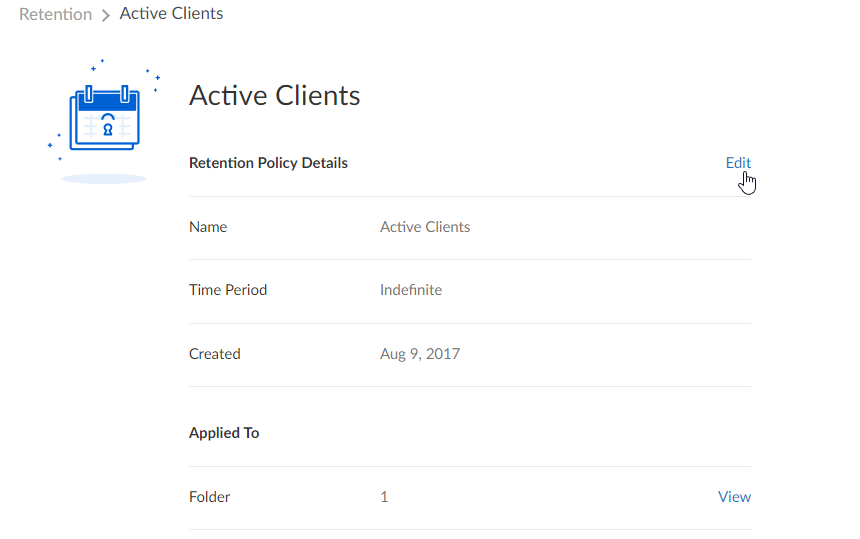
2. In the **Retention** tab, locate the policy you want to edit, and click on it. The policy details screen displays.
3. Next to the **Retention Policy Details** section, click **Edit**.
 4. Make the changes you want, then click **Save**.
**Note** To verify that your retention policy is in fact applied, in your admin console click **Reports** > **Create Report** and then navigate to **User Activity** > **Policies** > **Retention Policy Applied.**
4. Make the changes you want, then click **Save**.
**Note** To verify that your retention policy is in fact applied, in your admin console click **Reports** > **Create Report** and then navigate to **User Activity** > **Policies** > **Retention Policy Applied.**