> ## Documentation Index
> Fetch the complete documentation index at: https://docs.box.com/llms.txt
> Use this file to discover all available pages before exploring further.

# Box + SSO: Working with External Passwords

<div className="article_labels_list" style={{display: 'none'}} dangerouslySetInnerHTML={{__html: "has_image , End User , Billing , SSO , Instructions , Authentication , Article , Product Utilization , Established , Instruction"}} />

If your organization uses Single Sign On (SSO), you can use your company password to log into Box. However, Box also offers the ability to create an **External Password**. This can be used for:

* Logging into Box if your company is set to [SSO Test Mode](/en/box-admin-tools/box-security/setting-up-single-sign-on-sso-for-your-organization).
* Accessing Box via FTP, which does not support SSO.

## To set up an External Password

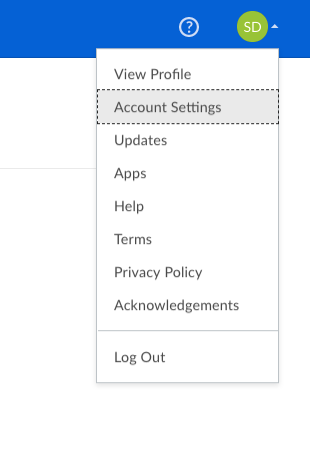
1. You can do so by logging into your Box via SSO.
2. Then go to your **Account Settings**.

   <Frame>
     <img src="https://mintcdn.com/product-docs/FFgx8Ia-ECpN-LGR/images/box-fundamentals/screen-shot-2018-02-20-at-8-49-53-am.png?fit=max&auto=format&n=FFgx8Ia-ECpN-LGR&q=85&s=0d62b6655f4904dc44914aeb1089b2e8" alt="screen-shot-2018-02-20-at-8-49-53-am-png" width="310" height="461" data-path="images/box-fundamentals/screen-shot-2018-02-20-at-8-49-53-am.png" />
   </Frame>
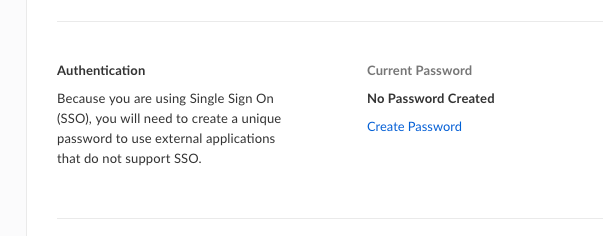
3. Under **Authentication** you will see that you can choose Create Password.
   <Frame>
     <img src="https://mintcdn.com/product-docs/FFgx8Ia-ECpN-LGR/images/box-fundamentals/screen-shot-2018-02-20-at-8-45-45-am.png?fit=max&auto=format&n=FFgx8Ia-ECpN-LGR&q=85&s=1f60b48539ef147571c966a239ef477c" alt="screen-shot-2018-02-20-at-8-45-45-am-png" width="603" height="236" data-path="images/box-fundamentals/screen-shot-2018-02-20-at-8-45-45-am.png" />
   </Frame>
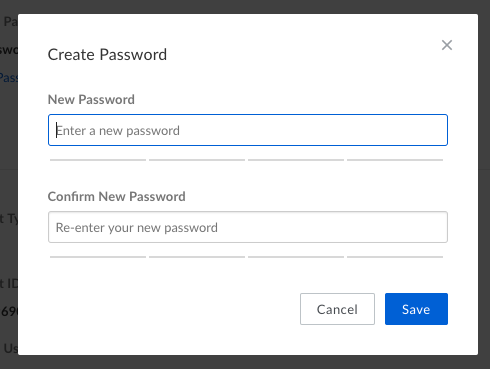
4. You can then create a new password.
   <Frame>
     <img src="https://mintcdn.com/product-docs/FFgx8Ia-ECpN-LGR/images/box-fundamentals/screen-shot-2018-02-20-at-8-46-16-am.png?fit=max&auto=format&n=FFgx8Ia-ECpN-LGR&q=85&s=db7dbc00cd2a64205c66a1127ee988a2" alt="screen-shot-2018-02-20-at-8-46-16-am-png" width="490" height="369" data-path="images/box-fundamentals/screen-shot-2018-02-20-at-8-46-16-am.png" />
   </Frame>

## If you wish to change your external password:

1. Go to **Account Settings**.

   <Frame>
     <img src="https://mintcdn.com/product-docs/FFgx8Ia-ECpN-LGR/images/box-fundamentals/screen-shot-2018-02-20-at-8-49-53-am.png?fit=max&auto=format&n=FFgx8Ia-ECpN-LGR&q=85&s=0d62b6655f4904dc44914aeb1089b2e8" alt="screen-shot-2018-02-20-at-8-49-53-am-png" width="310" height="461" data-path="images/box-fundamentals/screen-shot-2018-02-20-at-8-49-53-am.png" />
   </Frame>
2. Navigate to **Authentication.**
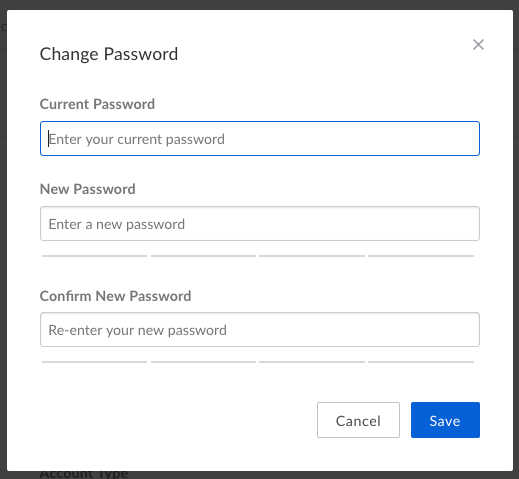
3. Then select **"Change Password"** to change your external password.
4. However, you will need to enter your **"Current Password"** (external password you had set) in order to change it. If you do not remember it continue below to follow steps for "If you forget your external password".
   <Frame>
     <img src="https://mintcdn.com/product-docs/FFgx8Ia-ECpN-LGR/images/box-fundamentals/screen-shot-2018-02-20-at-8-56-07-am.png?fit=max&auto=format&n=FFgx8Ia-ECpN-LGR&q=85&s=e2001bc6b66c7697fcf196d7a9d3c132" alt="screen-shot-2018-02-20-at-8-56-07-am-png" width="519" height="479" data-path="images/box-fundamentals/screen-shot-2018-02-20-at-8-56-07-am.png" />
   </Frame>

## If you forget your external password:

1. Go to your **Account Settings**.

   <Frame>
     <img src="https://mintcdn.com/product-docs/FFgx8Ia-ECpN-LGR/images/box-fundamentals/screen-shot-2018-02-20-at-8-49-53-am.png?fit=max&auto=format&n=FFgx8Ia-ECpN-LGR&q=85&s=0d62b6655f4904dc44914aeb1089b2e8" alt="screen-shot-2018-02-20-at-8-49-53-am-png" width="310" height="461" data-path="images/box-fundamentals/screen-shot-2018-02-20-at-8-49-53-am.png" />
   </Frame>
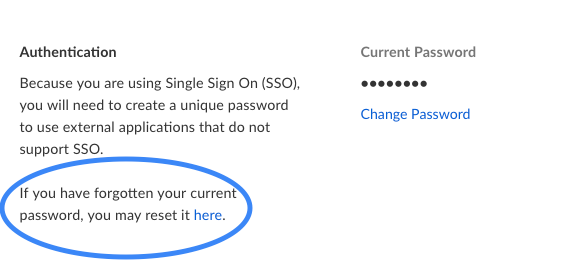
2. Navigate to **Authentication.**
3. Then select **"reset it here"** to change your external password if you have forgotten it.
   <Frame>
     <img src="https://mintcdn.com/product-docs/FFgx8Ia-ECpN-LGR/images/box-fundamentals/screen-shot-2018-02-20-at-8-52-08-am.png?fit=max&auto=format&n=FFgx8Ia-ECpN-LGR&q=85&s=e6caa5fd8e2f6866e36194af4f32e53e" alt="screen-shot-2018-02-20-at-8-52-08-am-png" width="575" height="280" data-path="images/box-fundamentals/screen-shot-2018-02-20-at-8-52-08-am.png" />
   </Frame>
