> ## Documentation Index
> Fetch the complete documentation index at: https://docs.box.com/llms.txt
> Use this file to discover all available pages before exploring further.
# Enabling Subtitles/Closed Captions in Video Preview
Box Preview supports captions that have been embedded into video files - that is, **single** video file in which the caption/subtitle data has been embedded. There are two notable variants of this:
1. The captions/subs exist as a separate text track in the video file.
2. The captions are contained in the video stream/track. The data is tightly coupled with the actual video picture data (but can still be toggled on/off).
Box does **not** support captions/subtitles as separate files. If you have a video with a separate subtitle file (e.g. .srt), you will need to embed the subtitle file into your video file using one of the methods outlined [below](#how-to-prepare-box-supported-closed-captionedsubtitled-videos).
**Note:** This feature is only available to Business-Plus users or higher.
## **Enabling Subtitles/Closed Captions**
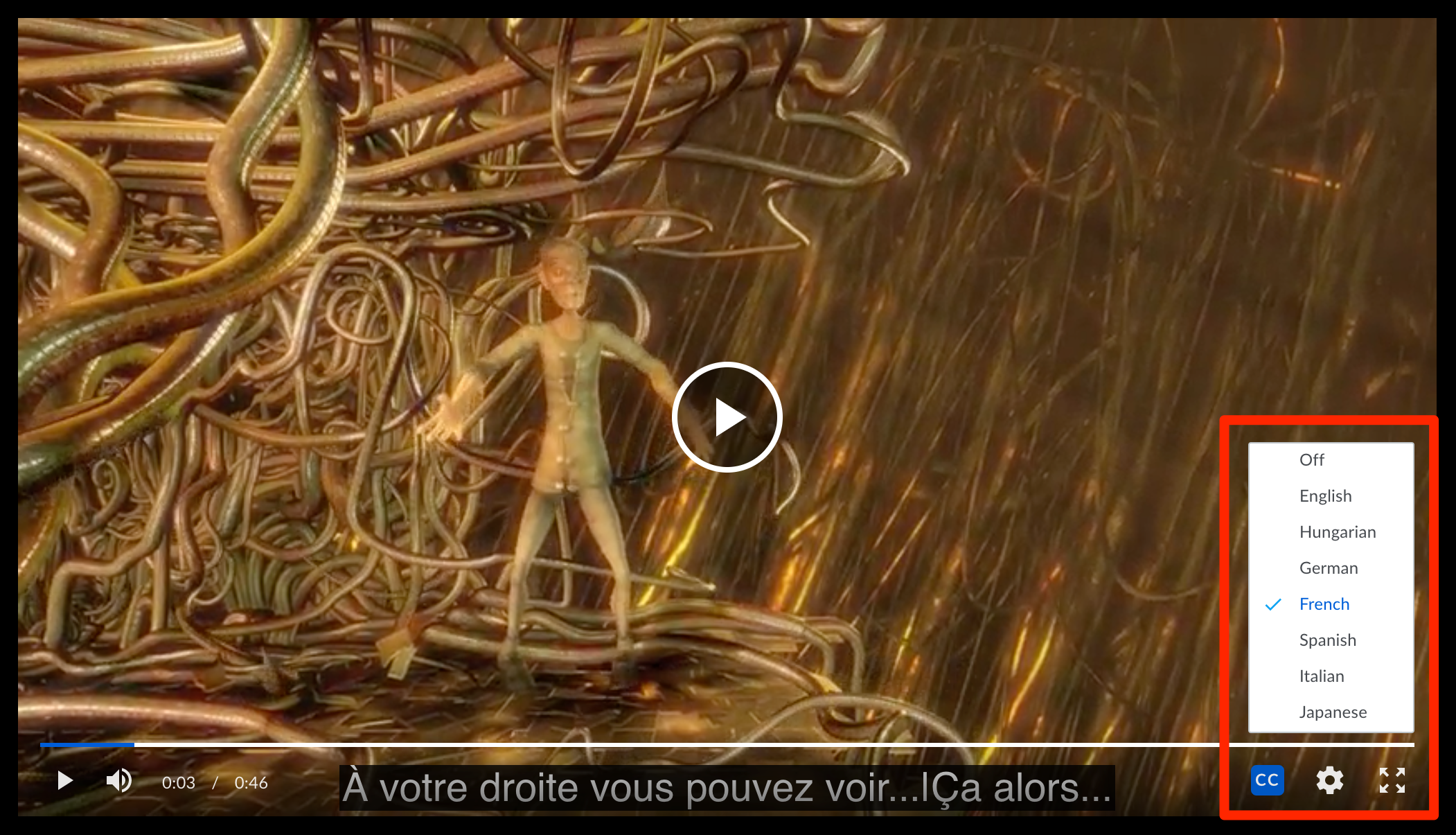
When you preview a video file that includes a subtitle track/closed captioning, you will see a button marked **CC** in the preview window. Clicking this button will toggle captions on or off. If your video includes multiple subtitle/caption tracks for different languages, you can select a specific subtitle track by opening the **Settings** menu (**Gear** icon) and clicking **Subtitles/CC.** Select the appropriate subtitle track and subtitles will be displayed at the bottom of the screen.
 **Notes and Limitations:**
* We do not yet honor positional and style cues. CC/Subtitles will be overlayed at the bottom of the video.
* CC/Subtitles do not yet show on mobile devices.
* This is only supported in our HD Video player. You must be at least in the Business-Plus tier to get HD video, and it is only supported on modern browsers (for IE11, only on Windows 8.1+).
**Notes and Limitations:**
* We do not yet honor positional and style cues. CC/Subtitles will be overlayed at the bottom of the video.
* CC/Subtitles do not yet show on mobile devices.
* This is only supported in our HD Video player. You must be at least in the Business-Plus tier to get HD video, and it is only supported on modern browsers (for IE11, only on Windows 8.1+).
**How to prepare Box-supported Closed Captioned/Subtitled videos**
If you have a video file and a separate SRT or VTT file for that video, there are a couple different solutions to view those subtitles in Box.
**General Tip:** For both options below, we recommend that the CC/Subtitles be encoded in UTF-8 and specify a language for the text track. Specifying a language will lead to a more user-friendly Preview experience in Box when the viewer is choosing subtitles for the video.
**Option 1:** Request a 3rd-party service to include the CC/subs in a self-contained video file.
This is the easiest solution. A 3rd-party captioning service may be willing to prepare the Box-required delivery format for you. The deliverable would be a single, self-contained video file with the captions inside (usually as a separate text track). Be sure to be clear that these need to be closed-captions, NOT open-captions (where the captions are burned into the video and cannot be hidden).
**Option 2:** Use a software tool to embed the SRT/VTT file into the video file.
If you have an existing workflow that produces an SRT/VTT file as a sidecar file, you can follow up that step by embedding the file into the video file to produce your final, self-contained captioned video. There are a few free software tools that make it easy to embed the SRT/VTT file into the video file as a separate track. We recommend you use a tool that does not require re-encoding the video file, as this will likely lead to less issues and complete nearly instantly.
| | | | | |
| -------------------------------------------------------- | ------------------- | ------------------ | ------------------------------------------------------------------------------------------------------------------------------------------------------------------------------------------------------------------------------------------------------------------------------------------------------------------------------- | -------------------------------- |
| Software | Operating System | Requires Re-encode | Instructions | Output |
| [YAMB](http://yamb.unite-video.com/) | Windows | No | [https://www.youtube.com/watch?v=Qtr7o2o4-XQ](https://www.youtube.com/watch?v=Qtr7o2o4-XQ) | mp4 with MPEG-4 Timed Text track |
| [MKVToolNix](https://mkvtoolnix.download/downloads.html) | Mac, Windows, Linux | No | [https://www.youtube.com/watch?v=GTZh8b4hpJM](https://www.youtube.com/watch?v=GTZh8b4hpJM) | mkv with SRT text track |
| [Handbrake](https://handbrake.fr/) | Mac, Windows, Linux | Yes | [https://www.youtube.com/watch?v=-AWtxpG5vAk](https://www.youtube.com/watch?v=-AWtxpG5vAk) | mp4 with MPEG-4 Timed Text track |
| [FFmpeg](https://www.ffmpeg.org/) | Mac, Windows, Linux | No | [https://stackoverflow.com/a/17584272](https://stackoverflow.com/a/17584272) [https://en.wikibooks.org/wiki/FFMPEG\_](https://en.wikibooks.org/wiki/FFMPEG_An_Intermediate_Guide/subtitle_options) [An\_Intermediate\_Guide/subtitle\_options](https://en.wikibooks.org/wiki/FFMPEG_An_Intermediate_Guide/subtitle_options) | mp4 with MPEG-4 Timed Text track |
There are also proprietary software options particularly for generating video with CEA-608/708 captions. These tools generally support more complicated workflows, and might make sense to use if you already have a workflow set up with them.
* [Adobe Premiere Pro](http://helpx.adobe.com/premiere-pro/using/closed-captioning.html)
* [Apple Final Cut Pro](https://support.apple.com/guide/final-cut-pro/welcome/mac)
* [MacCaption](https://www.telestream.net/captioning/workflow-file.htm)