> ## Documentation Index
> Fetch the complete documentation index at: https://docs.box.com/llms.txt
> Use this file to discover all available pages before exploring further.
# Creating Bookmarks
You can save any webpage to Box as a **bookmark**, helping you organize and quickly access the web-based content you visit most often. You can also use bookmarks as quick links to content for which you only have "viewer" permissions
## **To create a bookmark:**
* Click the **New** button found in the upper-right corner of the page. Select **Bookmark.**
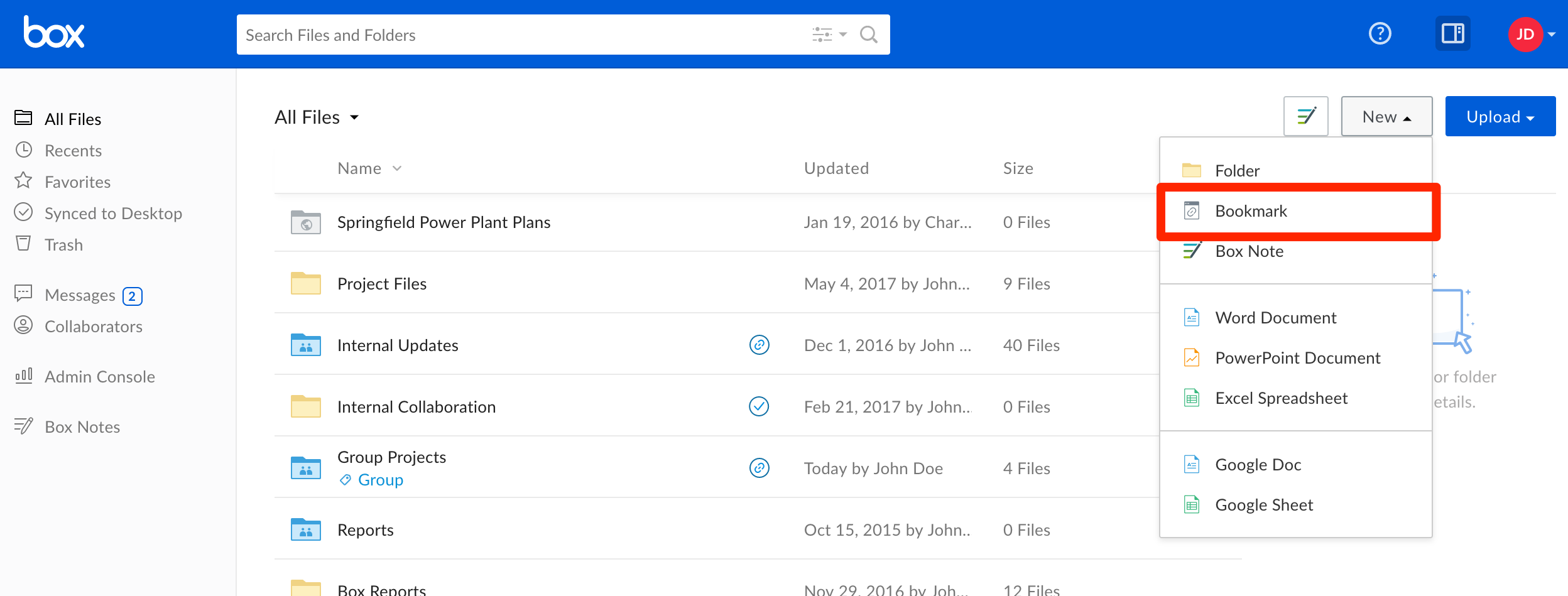 * A pop-up window will appear prompting you to enter the URL you wish to bookmark, and a name for your new bookmark. A description is optional.
* Click **Create** to complete the process.
Your bookmark will appear in the folder you are currently viewing. Clicking it will open the page in a new tab.
**Limitations:**
* Bookmarks cannot be synced as [Box Sync and Box Drive ignore web-based documents](https://support.box.com/hc/en-us/articles/360044195433).
* The bookmarked URL cannot exceed 500 characters.
* A pop-up window will appear prompting you to enter the URL you wish to bookmark, and a name for your new bookmark. A description is optional.
* Click **Create** to complete the process.
Your bookmark will appear in the folder you are currently viewing. Clicking it will open the page in a new tab.
**Limitations:**
* Bookmarks cannot be synced as [Box Sync and Box Drive ignore web-based documents](https://support.box.com/hc/en-us/articles/360044195433).
* The bookmarked URL cannot exceed 500 characters.