> ## Documentation Index
> Fetch the complete documentation index at: https://docs.box.com/llms.txt
> Use this file to discover all available pages before exploring further.

# Rename Files And Folders

<div className="article_labels_list" style={{display: 'none'}} dangerouslySetInnerHTML={{__html: "has_image , End User , Overview , Manage , Stay Organized , Rename , Article , Product Utilization , Established"}} />

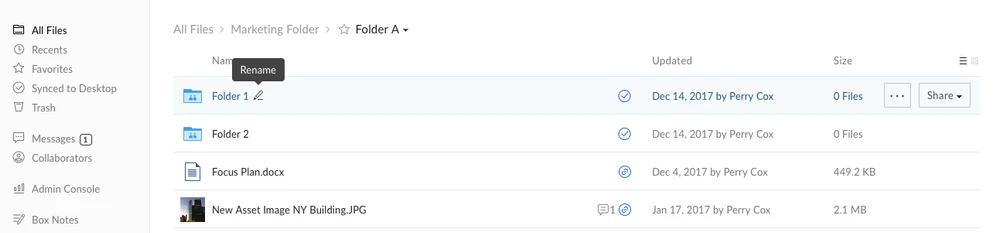
To **rename** a file or folder, **right-click** the item (or click the ellipses (**...**)), then select **Rename**. This will open up a text box where you can change the file name.
<Frame>
  <img src="https://mintcdn.com/product-docs/eGmBsXsUAf1Xqd2d/images/box-fundamentals/rename-file-more-options-menu.png?fit=max&auto=format&n=eGmBsXsUAf1Xqd2d&q=85&s=f5632533794c5d46722d5fdeac4ecffd" alt="File list with Rename option shown in the row actions menu." width="999" height="233" data-path="images/box-fundamentals/rename-file-more-options-menu.png" />
</Frame>

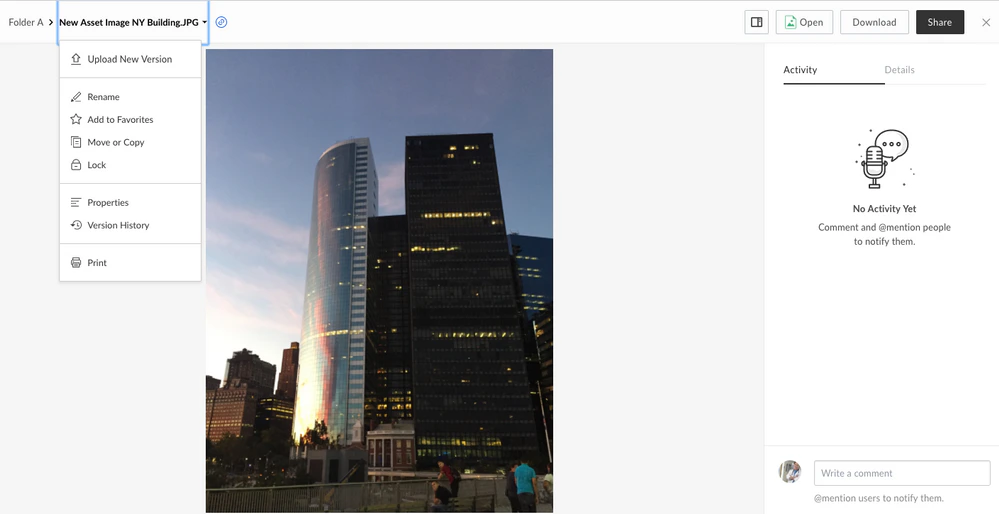
You can also rename a file from the preview screen.
<Frame>
  <img src="https://mintcdn.com/product-docs/eGmBsXsUAf1Xqd2d/images/box-fundamentals/rename-file-from-preview.png?fit=max&auto=format&n=eGmBsXsUAf1Xqd2d&q=85&s=8bf9d980f2f8e42706fa1f9ed5fcf35d" alt="File preview with editable file name field at the top of the screen." width="999" height="514" data-path="images/box-fundamentals/rename-file-from-preview.png" />
</Frame>

<Note>
  Folder paths have a limit of 255 characters so keep folder and file names as concise as possible to avoid running up against this limit.
</Note>
