> ## Documentation Index
> Fetch the complete documentation index at: https://docs.box.com/llms.txt
> Use this file to discover all available pages before exploring further.
# Accept and Reject Invitations from Collaborators
By default, you will automatically accept invitations to collaborate. If you would like to review invitations before accepting them, you modify your [Account Settings](/en/box-fundamentals/for-users/user-login-and-settings/manage-account-settings).
Navigate to the **Sharing** tab of your account settings, and uncheck the box under **Incoming Invitations** (in the **Collaborating on Content** section).
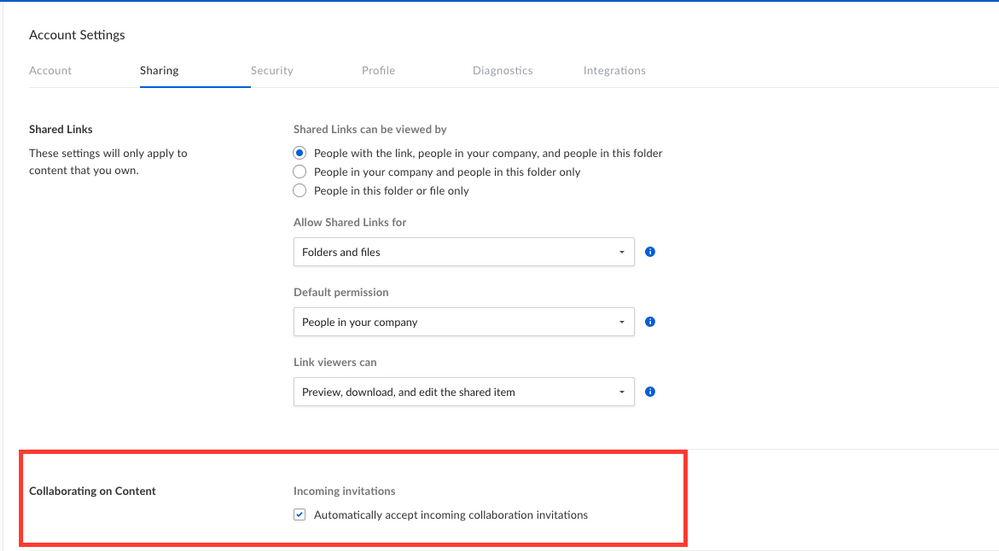 If you have unchecked this box, you will have to manually accept collaboration invitations by clicking the appropriate link in the email you receive. You can also view/accept/deny collaboration invitations from your [Notifications](/en/box-fundamentals/for-users/staying-organized/organizing-and-tracking-content/using-the-box-notification-center) screen.
### Pending invitations
The pending invitations panel saves you time by enabling you to quickly find and accept important invitations to keep your work flowing.
Pending invitations are requests for collaboration, or other actions, that you have not yet accepted or rejected. Pending invitations can come from collaborators, as well as from enterprises requiring you to perform special actions before you can access content.
The pending invitations panel lists invitations in groups based on category. Categories include:
* invitations from enterprises to create a strong password, and a button to update your password,
* invitations from enterprises to enroll in Two-factor Authentication (2FA), and a button to set up 2FA,
* invitations from enterprises to accept terms of service, and a button to view them,
* invitations from coworkers to collaborate on content, and a button to accept them.
For each invitation you've not accepted, the pending invitations panel displays the name of the file or project folder to which you're invited, how many pending invitations you have in the project folder, and a button for accepting the invitation.
If you have unchecked this box, you will have to manually accept collaboration invitations by clicking the appropriate link in the email you receive. You can also view/accept/deny collaboration invitations from your [Notifications](/en/box-fundamentals/for-users/staying-organized/organizing-and-tracking-content/using-the-box-notification-center) screen.
### Pending invitations
The pending invitations panel saves you time by enabling you to quickly find and accept important invitations to keep your work flowing.
Pending invitations are requests for collaboration, or other actions, that you have not yet accepted or rejected. Pending invitations can come from collaborators, as well as from enterprises requiring you to perform special actions before you can access content.
The pending invitations panel lists invitations in groups based on category. Categories include:
* invitations from enterprises to create a strong password, and a button to update your password,
* invitations from enterprises to enroll in Two-factor Authentication (2FA), and a button to set up 2FA,
* invitations from enterprises to accept terms of service, and a button to view them,
* invitations from coworkers to collaborate on content, and a button to accept them.
For each invitation you've not accepted, the pending invitations panel displays the name of the file or project folder to which you're invited, how many pending invitations you have in the project folder, and a button for accepting the invitation.
 **To find and resolve a pending invitation:**
1. In the left menu of your Box account window, click**Files**.
2. In the pending invitations panel under **ACTION REQUIRED**, hover on the name of a file or folder.
3. To see details about the invitation, click the ellipses, "**...**", and select **View Details**.
4. To decline the invitation, click the ellipses, "**...**", and select **Decline All**.
5. To accept the invitation and gain access to the project's content, click **Accept**.
**To find and resolve a pending invitation:**
1. In the left menu of your Box account window, click**Files**.
2. In the pending invitations panel under **ACTION REQUIRED**, hover on the name of a file or folder.
3. To see details about the invitation, click the ellipses, "**...**", and select **View Details**.
4. To decline the invitation, click the ellipses, "**...**", and select **Decline All**.
5. To accept the invitation and gain access to the project's content, click **Accept**.

 **Note**\
Based on the requirements of the inviting enterprise, after you accept an invitation, Box may prompt you to accept terms of service and/or configure a password before you can access the enterprise's shared content.
**Note**\
Based on the requirements of the inviting enterprise, after you accept an invitation, Box may prompt you to accept terms of service and/or configure a password before you can access the enterprise's shared content.