> ## Documentation Index
> Fetch the complete documentation index at: https://docs.box.com/llms.txt
> Use this file to discover all available pages before exploring further.
# About Box Doc Gen
Box Doc Gen enables you and your teams to dynamically generate custom documents instantly, such as offer letters, sales contracts, invoices, and so on.
**Notes:**
* Box Doc Gen is available only for Enterprise Advanced accounts.
* Box Doc Gen only supports the ability to use English template tags when creating and leveraging Box Doc Gen templates. We recommend that customers test and review that Box Doc Gen supports their desired language requirements when generating documents.
You can author Box Doc Gen templates, upload them to Box, and generate documents directly in Box using Box Doc Gen API.
Example use cases include:
| | |
| ------------------------ | --------------------------------------------------------------------------------------------------- |
| **Department** | **Example Use Cases** |
| Sales | Sales contracts, sales commissions reports, quotes, and invoices |
| Legal | NDAs, master services agreement, legal engagement letters, partnership and revenue share agreements |
| HR | Employee offer letters, promotions letters, stock allotment agreements, and employee contracts |
| Procurement / Operations | Invoices, RFPs and bids, work orders, and vendor agreements |
| Marketing | Partner marketing agreements, speaker agreements, and agency contracts |
| Finance | Investor reports, quarterly business reviews, and tax-related documents |
## Admin Enablment
As an Admin, you will need to enable Box Doc Gen for all your managed or selected users and groups before users can generate documents.
To access enablement settings:
1. Go to **Admin Console** -> **Enterprise Settings -> Content & Sharing Tab**
2. Visit [Enterprise Settings: Content & Sharing Tab](/en/box-admin-tools/box-admin-reference/enterprise-settings-content-sharing-tab#box-doc-gen) for configuring access
3. Click **Save**
## Generating Documents using Box Doc Gen
You can instantly generate documents from document templates uploaded to Box, or Box Doc Gen templates, with data fields that can be dynamically populated using the Box Doc Gen API.
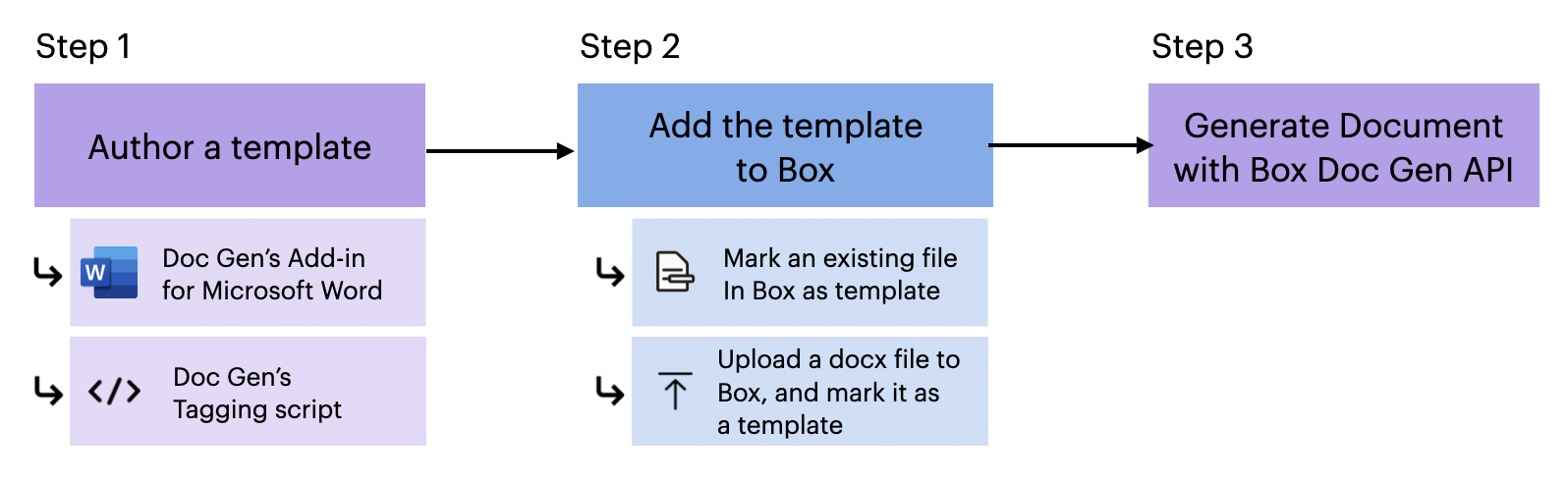
The process includes the following steps:
1. [Author your Box Doc Gen Template](/en/box-doc-gen/box-doc-gen-templates/managing-box-doc-gen-templates):
1. Use the [Doc Gen Template Creator Add-In for Microsoft Word](/en/box-doc-gen/box-doc-gen-installation/installing-the-box-doc-gen-template-creator-add-in-for-microsoft-word) to create a Box Doc Gen template.
2. Edit the template in one of the following ways:
* Compose Box Doc Gen templates by starting with your own JSON data and preparing your data set to automatically generate tags. You can either upload your own JSON file or manually add JSON data.
* Use [Box Doc Gen's tagging script to author the template](/en/box-doc-gen/box-doc-gen-templates/template-tags-reference-guide-and-examples) and your own Box Doc Gen tags, including test tags, image tags, conditional logic, calculated logic, custom tables and lists, as well as the ability to include [Box Sign template tags](/en/box-sign/templates/creating-templates-using-tags).
2. [Add the template to Box](/en/box-doc-gen/box-doc-gen-templates/managing-box-doc-gen-templates) using the following methods:
* * Upload the template that was created in Microsoft Word, or any other Word document, into your preferred save location folder, right-click the file, and select **Mark as Doc Gen template**.
* Upload the template directly within Box Doc Gen by selecting **Relay** in the left-hand pane, and then, on the **Doc Gen** tab, select **New >** **Doc Gen Template**.
3. [Generate the document](https://developer.box.com/guides/docgen/generate-document/) using Box Doc Gen API.
 **Note:** To use Box Doc Gen, you must have access to Microsoft Word, as it is required for creating and authoring Box Doc Gen templates. You can utilize the Box Doc Gen Template Creator add-in in Microsoft Word to apply tagging scripts within Microsoft Word to prepare your Box Doc Gen templates.
Box Doc Gen is designed to facilitate the dynamic generation of business documents, but it is important to note that Box does not have control over users’ access to Microsoft Word. Users must ensure they have the necessary permissions and access to Microsoft Word to create and author document templates effectively.
**Note:** To use Box Doc Gen, you must have access to Microsoft Word, as it is required for creating and authoring Box Doc Gen templates. You can utilize the Box Doc Gen Template Creator add-in in Microsoft Word to apply tagging scripts within Microsoft Word to prepare your Box Doc Gen templates.
Box Doc Gen is designed to facilitate the dynamic generation of business documents, but it is important to note that Box does not have control over users’ access to Microsoft Word. Users must ensure they have the necessary permissions and access to Microsoft Word to create and author document templates effectively.